How to Pay via PayPal Without a PayPal Account
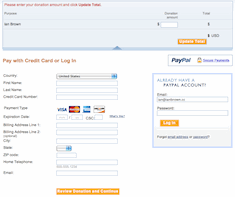
I just made a short video on how to pay for something via a PayPal button on a website without a PayPal account.
Here it is:
[youtube]http://www.youtube.com/watch?v=UQO6U_KhDnM[/youtube]
Ian has been involved with computers since very young. He took his first computer class when he was just 8 years old. He always had an affinity for computers, but never really took it seriously. It was not until he graduated from college and experienced the real world for a while did he realize that computers may be where his talent and passion lie. He has since branched out into Internet marketing and LOVES it.
He currently resides in Los Angeles where he services clients ranging from residential to small business to celebrities.







thanns my friend,very good i’ll try it
i will try it
If I understand correctly, it works for all purchases where PayPal is the only accepted payment type?
In other words, if I have a credit card, I don’t need to register with PayPal at all to purchase item where PayPal is the only payment method?
Thanks for the clarification!
I think your explanation does not work. To date it does not seems possible to pay in such way and the tool MANUAL PAYMENT DOES NOT SEEM TO EXIST ON PAYPAL…could u please help me find out how to do it?
thank you so much
Hi Ema,
There is no manual payment button on PayPal. That manual payment button in the video is on MY website. This video shows you how to pay for something that is being sold on a website that accepts PayPal payments. You do not get sent to PayPal.com to finalize the payment until AFTER you have clicked on the manual “Buy Now” button on the website from which you are purchasing the item.
hi ian, when i am testing out my paypal donation button, i get exactly everything as you have on your video, except at the very bottom after you fill in your name and credit card info it then asks you to create and confirm a paypal password, in effect forcing you to create a paypal account.
i have been trying to get this to work just as you have said but i have no idea why they are asking for this extra step … it turns off a few people from donating. anyway, you can check it out on my site http://seventhlifepath.com/numerology-personality-reading/ …. it’s the “buy me a coffee” link … : )
thanks for any assistance
Hi Seven,
I’m not sure what you’re doing, as I can’t replicate your problem, but I just made a blog post on how to do it. Go here:
http://www.ianbrown.cc/blog/how-to-add-the-ability-to-accept-donations-to-your-website-or-blog-or-request-donations-via-email-via-paypal-without-the-donors-having-to-sign-up-for-paypal/
I just want to know if this method also works if I just want to send money directly to someones Paypal account. If so, could you please explain how?
Hey Enock,
Yes, it does.
You have 2 (well, 2 1/2) options:
1a. You can have them make a “Buy Now” PayPal button and put it on a webpage, and then send you a link to the webpage:
https://www.paypal.com/cgi-bin/webscr?cmd=_singleitem-intro-outside
1b. They can also create a link they can email you while they are making the PayPal button (the last time I created a PayPal button, they allowed you to do that), and you can just click on the link they send you and pay with your credit/debit card. Just make sure, when they are making the button, they don’t require the user to sign up for a PayPal account in order to pay.
The PayPal “Buy Now” button should look something like the PayPal buttons on my payments page:
http://www.ianbrown.cc/blog/payments/
2. You can also just have them send you a money request via their PayPal account, and you can pay them via your credit/debit card that way as well.
https://www.paypal.com/webapps/mpp/requesting-payments
Hope that helps!