ianbrown.cc – computer tech & repair services – onsite and remote
  • Home
  • About Ian
  • Services
    • 10% Off Mobile Onsite Computer Repair – Greater Hartford, CT
  • Testimonials
  • Blog Archives
  • For Sale
  • Biofeedback Resources
    • + FREE DOWNLOAD
      The first 315 Pages of Nirvana Zarabi-Smith’s famous Quantum Encyclopedia ebook
      LIMITED TIME ONLY!
    • + FREE DOWNLOAD
      The first 100 pages of Nirvana Zarabi-Smith’s A-Z Protocols – INDIGO/SCIO ebook
      LIMITED TIME ONLY!
    • 25% Off Biofeedback Certification Courses at The Quantum Academies!
      LIMITED TIME ONLY!
  • Payments
  • Contact
Home
About Ian
Services
    10% Off Mobile Onsite Computer Repair – Greater Hartford, CT
Testimonials
Blog Archives
For Sale
Biofeedback Resources
    + FREE DOWNLOAD
The first 315 Pages of Nirvana Zarabi-Smith's famous Quantum Encyclopedia ebook
LIMITED TIME ONLY!

    + FREE DOWNLOAD
The first 100 pages of Nirvana Zarabi-Smith's A-Z Protocols – INDIGO/SCIO ebook
LIMITED TIME ONLY!

    25% Off Biofeedback Certification Courses at The Quantum Academies!
LIMITED TIME ONLY!

Payments
Contact
ianbrown.cc – computer tech & repair services – onsite and remote
  • Home
  • About Ian
  • Services
    • 10% Off Mobile Onsite Computer Repair – Greater Hartford, CT
  • Testimonials
  • Blog Archives
  • For Sale
  • Biofeedback Resources
    • + FREE DOWNLOAD
      The first 315 Pages of Nirvana Zarabi-Smith’s famous Quantum Encyclopedia ebook
      LIMITED TIME ONLY!
    • + FREE DOWNLOAD
      The first 100 pages of Nirvana Zarabi-Smith’s A-Z Protocols – INDIGO/SCIO ebook
      LIMITED TIME ONLY!
    • 25% Off Biofeedback Certification Courses at The Quantum Academies!
      LIMITED TIME ONLY!
  • Payments
  • Contact
Browsing Category
Archive
Announcements•Apple•Cool Products & Services•iPad•Video

Skype for iPad [LEAKED VIDEO]

June 24, 2011 by Ian Brown No Comments

I just found this video on YouTube. Apparently Skype uploaded it to their YouTube channel, but didn’t realize that it was public, and quickly privatized it. But not before a fan recorded the video (unfortunately, without audio) and threw it back up on YouTube. So I figured I would let you guys get a sneak peak of the Official Skype app for the iPad 2!

Enjoy!

[youtube]http://www.youtube.com/watch?v=a6f2rhc8ugw[/youtube]


Los Angeles Computer Repair | Los Angeles Computer Tech | Computer Repair Services

Share:
Reading time: 1 min
Cool Products & Services•iPhone & Mobile•Tips and Tricks

How to do a reverse lookup of a phone number to find out if it’s a land or mobile line and to discover its location

May 24, 2011 by Ian Brown No Comments

Ever have a need to know if a phone number is a land line or a cell phone number? Or maybe you want to know it’s location? Well, there’s an app for that. Kidding. I’m sure there is, but there’s a website for that as well.

Here it is:

www.reversenumberdatabase.com


Los Angeles Computer Repair | Los Angeles Computer Tech | Computer Repair Services

Share:
Reading time: 1 min
Supercars•Video

Awesome videos of the new Lamborghini Aventador LP700-4

May 16, 2011 by Ian Brown No Comments

I thought I would start sharing my passion for exotic sports cars, AKA supercars. I know this is a tech blog, but it’s MY tech blog. ;p I’m sure you’ll enjoy them.

If you’re not into supercars (at least not yet), then you should know that Lamborghini just came out with a new model called the Aventador LP700-4. It replaces the amazing Murcielago, and does a GREAT job doing it.

Here are the specs:

Power: 700 bhp (horsepower)
Torque: 509 lb-ft at 5,500 rpm
Drivetrain: All-wheel drive
0-62mph: 2.9 seconds! (that’s motorcycle fast!)
Top Speed: 217 mph

Not bad!

Lamborghini does a GREAT job having these videos produced. Not sure if they do it in-house or not, but the soundtracks that they use are perfect. They capture the amazing drama of this car.

So, here they are…

Enjoy!

2 Lamborghini Aventadors LP700-4 race around Rome, Italy HD

[youtube width=”560″ height=”349″]http://www.youtube.com/watch?v=5f6ivgq9KSY[/youtube]

2 Lamborghini Aventadors LP700-4 racing in Bracciano Hills, Italy HD

[youtube width=”560″ height=”349″]http://www.youtube.com/watch?v=2SK2AToql9o[/youtube]

Lamborghini Aventador LP700-4 Official Commercial HD

[youtube width=”560″ height=”349″]http://www.youtube.com/watch?v=NfZKfy94Q6A[/youtube]
Los Angeles Computer Repair | Los Angeles Computer Tech | Computer Repair Services

Share:
Reading time: 1 min
Data Recovery•Errors•Hardware Issues•PC•Tips and Tricks•Windows 7

Is your SATA drive NOT being seen in Windows but it IS being seen in your BIOS? Is Windows calling it a Foreign Dynamic disk drive in Disk Management?

by Ian Brown 6 Comments

I just had a client who reformatted his drive and reinstalled Windows XP Pro on it. After he did that, when he reattached the 2 other SATA internal hard drives that he has for his data, one showed up fine, and the other showed up as a “Foreign Domestic Drive” and had a yellow question mark next to it in Disk Management (see image of similar situation below).
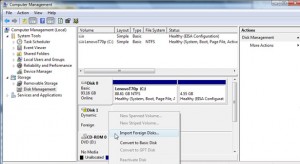
(click to enlarge)

 
When I RIGHT-clicked on it in Disk Management, it gave the options to either “convert to basic disk” (which you do NOT want to do unless you want to lose all of your data), or to “Import Foreign Disk.” The answer was to Import Foreign Disk. It only took about 10 seconds.

So here’s how to get to Disk Management in Windows XP to do this:

1. Log on as administrator or as a member of the Administrators group (which basically means just log into your computer since a user is set up as an “Administrator” by default)
2. Click Start button in bottom left
3. Click Run (Windows 7 or Vista see below)
4. Type compmgmt.msc (Windows 7 or Vista see below)
5. Click OK (Windows 7 or Vista see below)
6. In the console tree, click Disk Management (Windows 7 or Vista see below)

NOTE 1: If you’re using Windows 7 or Vista, skip steps 3 – 6 above, and after you click the colored start ball in the bottom left of your screen, simply type Disk Management in the search field and hit your key to get to Disk Management.

7. Once in Disk Management, RIGHT-click on the section for the hard drive in question where the yellow exclamation mark is on the the icon for the hard drive (same section where it as “Dynamic Foreign”; see image above)
8. Select “Import Foreign Disk”
9. It will take about 10 seconds to do its thing
10. It will then ask, “Before using these disks, add them to your system configuration. Disk groups: ” Below that text will be a box with a check box already checked next to “Foreign disk group (1 of 1 disk).” Yes, you want to do that. Just click OK.
11. After this, you should be good to go and have all of your data back, so check it.

NOTE 2: During my research, one guy said after he clicked “Import Foreign Disk,” it hanged for about 10 hours, however everyone else said that it worked. And it worked for my client. So maybe that one guy was experiencing a user error or had a more serious problem. But I still feel compelled to say to do this at your own risk.

After you do this, the only thing that will be different is that the bar in Disk Management for that disk that was just imported will be green instead of blue. But other than that, things will be back to normal.

NOTE 3: If you your disk is being classified as “invalid” instead of “foreign,” then you might have it connected via USB, which Windows Vista & 7 do not like. If that’s the case, then find a way to connect it directly via SATA or IDE (depending on what kind of drive it is), and then it should show up as a foreign drive and you can follow the above instructions to import it.

Enjoy!


Los Angeles Computer Repair | Los Angeles Computer Tech | Computer Repair Services

Share:
Reading time: 2 min
Page 10 of 58« First...«9101112»203040...Last »

FREE DOWNLOADS


Get immediate access to the first 315 pages of Nirvana Zarabi-Smith’s famous Quantum Encyclopedia book and get 10% OFF!

Click here!

LIMITED TIME ONLY!

Now compatible with iPad and Android tablets!


Get immediate access to the first 100 pages of the 6th edition of Nirvana Zarabi-Smith’s incredibly useful A-Z Protocols book and get 10% OFF!

Click here!

LIMITED TIME ONLY!

Now compatible with iPad and Android tablets!

25% OFF Biofeedback Certification Training!

Have you been yearning to get certified as a biofeedback professional? Would you like to deepen your biofeedback knowledge so you can get the most out of your device?

Then take advantage of this
LIMITED TIME OFFER of getting 25% OFF of Nirvana Zarabi-Smith’s amazing Biofeedback Certification Training Program!

Click here!

LIMITED TIME ONLY!

Recent Posts

Do you find personalized ads on your smartphone “creepy”?  Here’s how to opt-out.

Do you find personalized ads on your smartphone “creepy”? Here’s how to opt-out.

January 31, 2016
How to get rid of the annoying Windows 10 Free Upgrade notification

How to get rid of the annoying Windows 10 Free Upgrade notification

August 29, 2015
How to turn any song into a cool iPhone ringtone (mp3)

How to turn any song into a cool iPhone ringtone (mp3)

March 12, 2015
Is your Mac slow?  Here are the 6 top ways to speed up your Mac!

Is your Mac slow? Here are the 6 top ways to speed up your Mac!

February 6, 2015

Blog Post Categories

Archives

© 2020 copyright Ian Brown // All rights reserved