ianbrown.cc – computer tech & repair services – onsite and remote
  • Home
  • About Ian
  • Services
    • 10% Off Mobile Onsite Computer Repair – Greater Hartford, CT
  • Testimonials
  • Blog Archives
  • For Sale
  • Biofeedback Resources
    • + FREE DOWNLOAD
      The first 315 Pages of Nirvana Zarabi-Smith’s famous Quantum Encyclopedia ebook
      LIMITED TIME ONLY!
    • + FREE DOWNLOAD
      The first 100 pages of Nirvana Zarabi-Smith’s A-Z Protocols – INDIGO/SCIO ebook
      LIMITED TIME ONLY!
    • 25% Off Biofeedback Certification Courses at The Quantum Academies!
      LIMITED TIME ONLY!
  • Payments
  • Contact
Home
About Ian
Services
    10% Off Mobile Onsite Computer Repair – Greater Hartford, CT
Testimonials
Blog Archives
For Sale
Biofeedback Resources
    + FREE DOWNLOAD
The first 315 Pages of Nirvana Zarabi-Smith's famous Quantum Encyclopedia ebook
LIMITED TIME ONLY!

    + FREE DOWNLOAD
The first 100 pages of Nirvana Zarabi-Smith's A-Z Protocols – INDIGO/SCIO ebook
LIMITED TIME ONLY!

    25% Off Biofeedback Certification Courses at The Quantum Academies!
LIMITED TIME ONLY!

Payments
Contact
ianbrown.cc – computer tech & repair services – onsite and remote
  • Home
  • About Ian
  • Services
    • 10% Off Mobile Onsite Computer Repair – Greater Hartford, CT
  • Testimonials
  • Blog Archives
  • For Sale
  • Biofeedback Resources
    • + FREE DOWNLOAD
      The first 315 Pages of Nirvana Zarabi-Smith’s famous Quantum Encyclopedia ebook
      LIMITED TIME ONLY!
    • + FREE DOWNLOAD
      The first 100 pages of Nirvana Zarabi-Smith’s A-Z Protocols – INDIGO/SCIO ebook
      LIMITED TIME ONLY!
    • 25% Off Biofeedback Certification Courses at The Quantum Academies!
      LIMITED TIME ONLY!
  • Payments
  • Contact
Browsing Tag
mac
Mac•Tips and Tricks•Video

How to Burn an .ISO File with Your Mac [VIDEO]

How to Burn an ISO File with Your Mac
April 30, 2011 by Ian Brown No Comments

Want to know how to burn an .ISO file with your Mac? Here’s a quick video that I made that walks you through the entire process.

If you’re not sure what an .ISO file is, it’s simply a disk image file that, when you burn it to a CD, it creates an exact duplicate of the CD that the ISO file was made from. You usually download an ISO file from the Internet so you can burn it to CD.

Here’s the video:

[youtube]http://www.youtube.com/watch?v=a-ZoH3H9Tsw[/youtube]

And here are the written instructions on how to do it so you have them:

1. Insert a blank CD into your Mac
2. Go to Applications>Utilities>Disk Utility
3. Go to File
4. Select “Open Disk Image”
5. Browse to the .ISO file you want to burn
6. Click Open
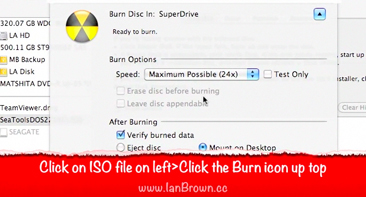
7. Click on .ISO file listed on left side of Disk Utility
8. Click the “Burn” icon at the top of the Disk Utility window
9. Select “Eject Disk” or “Mount on Desktop” to choose what you want it to do after it finishes burning
10. Click Burn (it may take longer to burn your ISO file; SeaTools is only 8.9MB in size)
11. It should come up with the message, “Image “Name of .ISO File” burned successfully.”
12. The disk will either eject automatically or appear on your Desktop, depending on what you chose in Step #9
13. Double-click on the CD to make sure the files got burned to the CD (insert the CD again if it you chose for it to eject automatically)
14. Done!


Los Angeles Computer Repair | Los Angeles Computer Tech | Computer Repair Services

Share:
Reading time: 1 min
Mac•Software•Tips and Tricks

Apple’s Mac App Store does not sell installation files for apps, it sells applications that automatically get installed on the Mac that buys it

February 9, 2011 by Ian Brown 3 Comments

Today I attempted to purchase an Apple application called, Pages (Mac’s equivalent to MS Word), on my Mac via the Mac App Store. Pages is part of Apple’s iLife software suite. It’s a great suite and is MUCH less expensive than M$’s Office.

Anyway, since my client does not have the latest version of Apple’s Mac OS X, Snow Leopard 10.6, and you need Snow Leopard to get the Mac App Store, I decided to purchase it for him on my Mac since I had the Mac App Store already installed.

Well, we signed in with his Apple ID, clicked on “Buy,” entered his password again, and NOTHING. Tried it again. NOTHING. Signed me out of iTunes thinking me being logged into my iTunes account on my Mac while logging into his account via the Mac App store was causing an issue. It wasn’t. Still didn’t work.

Called Apple, and we tried doing it via a different user account on my Mac. Still no go. So they told us to contact iTunes. That was going to take too long, so I thought of the brilliant concept to just buy it for him and have him pay me for it. So I did.

When I clicked “Buy” while logged in with my account, it worked flawlessly. However, there was one thing that we were not aware of. When you buy an app from the Mac App Store, you are not buying the installation file that you can just throw on a USB stick and install on another Mac. You are buying the app being installed on the Mac that you are using to buy it, and that’s it! It works just like a software update. It downloads, and then installs right away.

Just thought I would share that little tidbit with ya so you don’t waste any money buying software for a friend or family member because you have the latest version of Mac OS X and they don’t.

Of course I understand why Apple does this, and I’m sure you do, too. If we were buying the installation file, we could just take it and install it on multiple computers while only paying for one copy.

However, they could monitor that by setting it up so that you have to enter a product key to install it, which would be noted on their servers (Like MS does with their OS), and then it would know that it has already been installed on a system if you try to install it on another Mac.

But, Apple certainly seems to know what they are doing, and I love them for it. So, I’ll let this slide and enjoy the latest version of Pages. ;)

Update: You can actually buy one app and install it on all of your Macs. All you have to do is log into the App store of each of your other Macs with the same Apple ID that you used to purchase it, and it will let you download and install it. You’ll simply do that process for each of your Macs.

The second way of going about this would be to download the trial version of iWork if you don’t mind paying for the whole suite, and then purchase a serial number for it if you like it. However, just realize that if you buy them separately in the App Store, you’ll save $15.

One of our readers pointed this out. Thanks, Justin!

Los Angeles Computer Repair | Los Angeles Computer Tech | Computer Repair Services
Share:
Reading time: 2 min
Mac•Tips and Tricks

Is your keyboard on your Macbook suddenly not working or acting strange?

May 2, 2010 by Ian Brown No Comments

Is your keyboard not typing the keys that you are hitting, and some keys do type something but the type numbers and symbols from a calculator (namely the U,I,O,P,:,L,K,J,M,< ,>./ keys?)

There is a simple fix for this…

Continue reading
Share:
Reading time: 1 min
Tips and Tricks

How to Get Your Mac to Convert Text to Speech for Free

March 16, 2010 by Ian Brown No Comments

Do you have a need for your Mac to read you any text you want? I know this trick definitely comes in handy when you are tired of reading, but you still want to continue to take in the information that you’re reading. So, here is a handy tip that will help you do just that.

Continue reading
Share:
Reading time: 1 min

FREE DOWNLOADS


Get immediate access to the first 315 pages of Nirvana Zarabi-Smith’s famous Quantum Encyclopedia book and get 10% OFF!

Click here!

LIMITED TIME ONLY!

Now compatible with iPad and Android tablets!


Get immediate access to the first 100 pages of the 6th edition of Nirvana Zarabi-Smith’s incredibly useful A-Z Protocols book and get 10% OFF!

Click here!

LIMITED TIME ONLY!

Now compatible with iPad and Android tablets!

25% OFF Biofeedback Certification Training!

Have you been yearning to get certified as a biofeedback professional? Would you like to deepen your biofeedback knowledge so you can get the most out of your device?

Then take advantage of this
LIMITED TIME OFFER of getting 25% OFF of Nirvana Zarabi-Smith’s amazing Biofeedback Certification Training Program!

Click here!

LIMITED TIME ONLY!

Recent Posts

Do you find personalized ads on your smartphone “creepy”?  Here’s how to opt-out.

Do you find personalized ads on your smartphone “creepy”? Here’s how to opt-out.

January 31, 2016
How to get rid of the annoying Windows 10 Free Upgrade notification

How to get rid of the annoying Windows 10 Free Upgrade notification

August 29, 2015
How to turn any song into a cool iPhone ringtone (mp3)

How to turn any song into a cool iPhone ringtone (mp3)

March 12, 2015
Is your Mac slow?  Here are the 6 top ways to speed up your Mac!

Is your Mac slow? Here are the 6 top ways to speed up your Mac!

February 6, 2015

Blog Post Categories

Archives

© 2020 copyright Ian Brown // All rights reserved