ianbrown.cc – computer tech & repair services – onsite and remote
  • Home
  • About Ian
  • Services
    • 10% Off Mobile Onsite Computer Repair – Greater Hartford, CT
  • Testimonials
  • Blog Archives
  • For Sale
  • Biofeedback Resources
    • + FREE DOWNLOAD
      The first 315 Pages of Nirvana Zarabi-Smith’s famous Quantum Encyclopedia ebook
      LIMITED TIME ONLY!
    • + FREE DOWNLOAD
      The first 100 pages of Nirvana Zarabi-Smith’s A-Z Protocols – INDIGO/SCIO ebook
      LIMITED TIME ONLY!
    • 25% Off Biofeedback Certification Courses at The Quantum Academies!
      LIMITED TIME ONLY!
  • Payments
  • Contact
Home
About Ian
Services
    10% Off Mobile Onsite Computer Repair – Greater Hartford, CT
Testimonials
Blog Archives
For Sale
Biofeedback Resources
    + FREE DOWNLOAD
The first 315 Pages of Nirvana Zarabi-Smith's famous Quantum Encyclopedia ebook
LIMITED TIME ONLY!

    + FREE DOWNLOAD
The first 100 pages of Nirvana Zarabi-Smith's A-Z Protocols – INDIGO/SCIO ebook
LIMITED TIME ONLY!

    25% Off Biofeedback Certification Courses at The Quantum Academies!
LIMITED TIME ONLY!

Payments
Contact
ianbrown.cc – computer tech & repair services – onsite and remote
  • Home
  • About Ian
  • Services
    • 10% Off Mobile Onsite Computer Repair – Greater Hartford, CT
  • Testimonials
  • Blog Archives
  • For Sale
  • Biofeedback Resources
    • + FREE DOWNLOAD
      The first 315 Pages of Nirvana Zarabi-Smith’s famous Quantum Encyclopedia ebook
      LIMITED TIME ONLY!
    • + FREE DOWNLOAD
      The first 100 pages of Nirvana Zarabi-Smith’s A-Z Protocols – INDIGO/SCIO ebook
      LIMITED TIME ONLY!
    • 25% Off Biofeedback Certification Courses at The Quantum Academies!
      LIMITED TIME ONLY!
  • Payments
  • Contact
Browsing Category
Tips and Tricks
Errors•Tips and Tricks•YouTube

YouTube Upload Error? Bad Value?

April 30, 2011 by Ian Brown No Comments

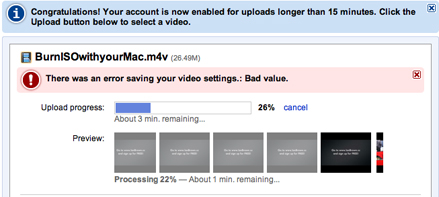
Did you get a “bad value” error while uploading a video to YouTube? Want to know what the deal is? It’s simply that there is a symbol in the description of your video that you typed that YouTube doesn’t like.

The one that gave me the error was the “>” symbol. So if you used “>” or “< " in the desription of your video, then that's your problem. Simply delete it and then save your changes. If that was not what you used, then look for other symbols in your description. Just try deleting each one, one by one, saving it after you delete each one so you know which one is causing the issue. If there are other characters that you used in your description that caused this error and you know what it is, then please post it in the comments below so others can benefit. Thanks!
Los Angeles Computer Repair | Los Angeles Computer Tech | Computer Repair Services
Share:
Reading time: 1 min
Mac•Tips and Tricks•Video

How to Burn an .ISO File with Your Mac [VIDEO]

How to Burn an ISO File with Your Mac
by Ian Brown No Comments

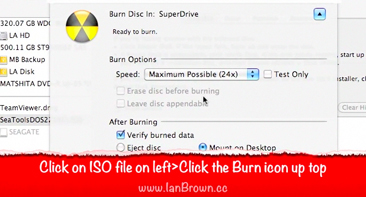
Want to know how to burn an .ISO file with your Mac? Here’s a quick video that I made that walks you through the entire process.

If you’re not sure what an .ISO file is, it’s simply a disk image file that, when you burn it to a CD, it creates an exact duplicate of the CD that the ISO file was made from. You usually download an ISO file from the Internet so you can burn it to CD.

Here’s the video:

[youtube]http://www.youtube.com/watch?v=a-ZoH3H9Tsw[/youtube]

And here are the written instructions on how to do it so you have them:

1. Insert a blank CD into your Mac
2. Go to Applications>Utilities>Disk Utility
3. Go to File
4. Select “Open Disk Image”
5. Browse to the .ISO file you want to burn
6. Click Open
7. Click on .ISO file listed on left side of Disk Utility
8. Click the “Burn” icon at the top of the Disk Utility window
9. Select “Eject Disk” or “Mount on Desktop” to choose what you want it to do after it finishes burning
10. Click Burn (it may take longer to burn your ISO file; SeaTools is only 8.9MB in size)
11. It should come up with the message, “Image “Name of .ISO File” burned successfully.”
12. The disk will either eject automatically or appear on your Desktop, depending on what you chose in Step #9
13. Double-click on the CD to make sure the files got burned to the CD (insert the CD again if it you chose for it to eject automatically)
14. Done!


Los Angeles Computer Repair | Los Angeles Computer Tech | Computer Repair Services
Share:
Reading time: 1 min
Errors•Software•Tips and Tricks

Getting the error message, “iTunes requires a computer with a G4 G5 or Intel processor?”

April 5, 2011 by Ian Brown 1 Comment

If you’re getting the message, “iTunes requires a computer with a G4, G5 or Intel processor”, then that means you’re dealing with an older Mac that has a G3 processor or earlier that is not compatible with the latest version of iTunes.

What’s the fix?

Well, you have to dig around the Internet to find it, but Sarah, a visitor to my blog, emailed me and asked me what to do. So I did some research, and found that if you are running Mac OS X 10.4.1, which is Tiger, then all you need to do is install iTunes 8.4, which you can get here:

Download iTunes 8.4 for Mac
(again, you have to have a G3 processor, and you have to be running 10.4.1 (Tiger) or later)

However, if you are running, let’s say, Mac OS X 10.3.9, which is what she was running, then this is where you need to dig a little deeper on the Internet to find your solution.

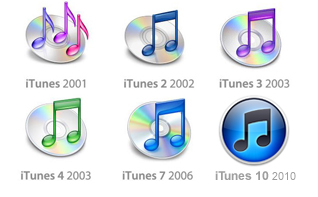
Luckily, the boys over at ihackintosh.com did the dirty work for me. They made a blog post that has the direct Apple download links to previous versions of iTunes, from version 7.4 to 8.2 for both Mac and PC. However, you’ll need to research which version is best for your system. Google is your friend in this type of situation.

Check out their list of vintage iTunes download links here.

By the way, the solution I suggested for Sarah was to give iTunes version 7.4 a try. I’ll send her the link to this post, and hopefully she’ll return with positive results that she’ll post in the comments below. I’m sure she’s have some good news. ;)


Los Angeles Computer Repair | Los Angeles Computer Tech | Computer Repair Services
Share:
Reading time: 1 min
Cool Products & Services•Mac•Software•Tips and Tricks

A cool and efficient way to take notes with your Mac!

March 13, 2011 by Ian Brown No Comments

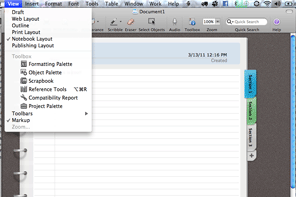
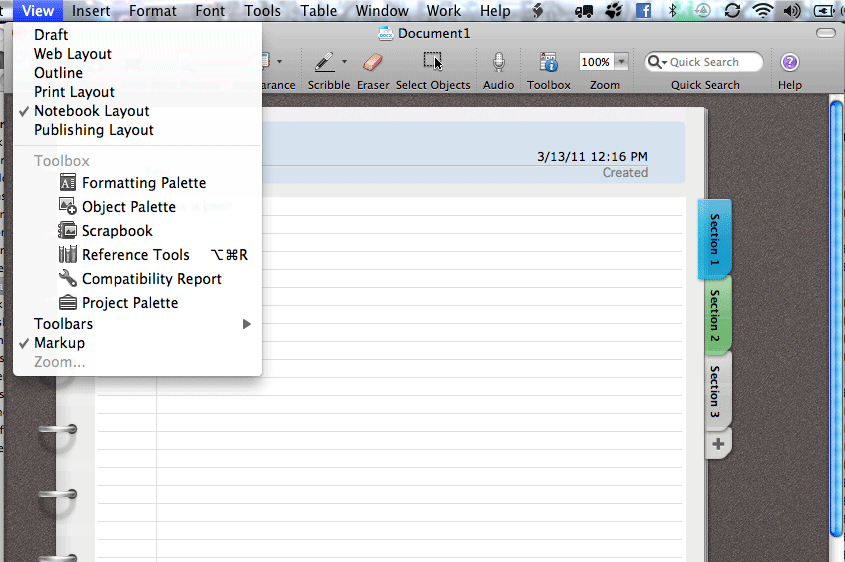
I was sitting in Starbucks doing some work when I saw a girl going over her notes on her Mac in MS Word, but with a very cool layout…a layout that not only looked like a real notebook, but that also had tabs! Just having the notebook layout may be cool for students, but it’s not very functional. However, adding the use of tabs to the mix makes all the difference.

Take a look:

MS Word Notebook Layout

Why does tabs add so much more to it?

Let’s say you’re at a seminar with multiple speakers. Instead of having one LONG documents that has notes from each speaker, or instead of having multiple docs, one for each speaker, you can now have ONE document with your notes from each speaker separated by tabs! So much easier to work with and find things.

To activate it, all you have to do is go to VIEW>NOTEBOOK LAYOUT. Then click on each tab on the right to go to that section of the document. To ADD a tab, just click on the “+” below the last tab. And to delete a tab, just RIGHT-click the tab you want to delete and select “delete.”

The version of MS Office that I’m running is MS Office Home and Business for Mac, but, of course, it’s also a feature in Word in MS Office Home & Student.

Enjoy!


Los Angeles Computer Repair | Los Angeles Computer Tech | Computer Repair Services

Share:
Reading time: 1 min
Page 4 of 32« First...«3456»102030...Last »

FREE DOWNLOADS


Get immediate access to the first 315 pages of Nirvana Zarabi-Smith’s famous Quantum Encyclopedia book and get 10% OFF!

Click here!

LIMITED TIME ONLY!

Now compatible with iPad and Android tablets!


Get immediate access to the first 100 pages of the 6th edition of Nirvana Zarabi-Smith’s incredibly useful A-Z Protocols book and get 10% OFF!

Click here!

LIMITED TIME ONLY!

Now compatible with iPad and Android tablets!

25% OFF Biofeedback Certification Training!

Have you been yearning to get certified as a biofeedback professional? Would you like to deepen your biofeedback knowledge so you can get the most out of your device?

Then take advantage of this
LIMITED TIME OFFER of getting 25% OFF of Nirvana Zarabi-Smith’s amazing Biofeedback Certification Training Program!

Click here!

LIMITED TIME ONLY!

Recent Posts

Do you find personalized ads on your smartphone “creepy”?  Here’s how to opt-out.

Do you find personalized ads on your smartphone “creepy”? Here’s how to opt-out.

January 31, 2016
How to get rid of the annoying Windows 10 Free Upgrade notification

How to get rid of the annoying Windows 10 Free Upgrade notification

August 29, 2015
How to turn any song into a cool iPhone ringtone (mp3)

How to turn any song into a cool iPhone ringtone (mp3)

March 12, 2015
Is your Mac slow?  Here are the 6 top ways to speed up your Mac!

Is your Mac slow? Here are the 6 top ways to speed up your Mac!

February 6, 2015

Blog Post Categories

Archives

© 2020 copyright Ian Brown // All rights reserved





