
ianbrown.cc – computer tech & repair services – onsite and remote
  • Home
  • About Ian
  • Services
    • 10% Off Mobile Onsite Computer Repair – Greater Hartford, CT
  • Testimonials
  • Blog Archives
  • For Sale
  • Biofeedback Resources
    • + FREE DOWNLOAD
      The first 315 Pages of Nirvana Zarabi-Smith’s famous Quantum Encyclopedia ebook
      LIMITED TIME ONLY!
    • + FREE DOWNLOAD
      The first 100 pages of Nirvana Zarabi-Smith’s A-Z Protocols – INDIGO/SCIO ebook
      LIMITED TIME ONLY!
    • 25% Off Biofeedback Certification Courses at The Quantum Academies!
      LIMITED TIME ONLY!
  • Payments
  • Contact
Home
About Ian
Services
    10% Off Mobile Onsite Computer Repair – Greater Hartford, CT
Testimonials
Blog Archives
For Sale
Biofeedback Resources
    + FREE DOWNLOAD
The first 315 Pages of Nirvana Zarabi-Smith's famous Quantum Encyclopedia ebook
LIMITED TIME ONLY!

    + FREE DOWNLOAD
The first 100 pages of Nirvana Zarabi-Smith's A-Z Protocols – INDIGO/SCIO ebook
LIMITED TIME ONLY!

    25% Off Biofeedback Certification Courses at The Quantum Academies!
LIMITED TIME ONLY!

Payments
Contact
ianbrown.cc – computer tech & repair services – onsite and remote
  • Home
  • About Ian
  • Services
    • 10% Off Mobile Onsite Computer Repair – Greater Hartford, CT
  • Testimonials
  • Blog Archives
  • For Sale
  • Biofeedback Resources
    • + FREE DOWNLOAD
      The first 315 Pages of Nirvana Zarabi-Smith’s famous Quantum Encyclopedia ebook
      LIMITED TIME ONLY!
    • + FREE DOWNLOAD
      The first 100 pages of Nirvana Zarabi-Smith’s A-Z Protocols – INDIGO/SCIO ebook
      LIMITED TIME ONLY!
    • 25% Off Biofeedback Certification Courses at The Quantum Academies!
      LIMITED TIME ONLY!
  • Payments
  • Contact
Browsing Category
Breaking News
Announcements•Apple•Breaking News•Cool Products & Services•iPad•iPhone & Mobile•Mobile•News

Google Maps Finally Hits the iOS App Store!

December 12, 2012 by Ian Brown No Comments

The long awaited Google Maps app for iOS devices FINALLY hit the App Store tonight! Although people have been having fewer and fewer problems with Apple’s Map app, Google still is king of maps, especially with the public transit maps.

google-maps-500

And the cool thing is, even if you have an iPhone 4 or 3GS, you get turn-by-turn voice navigation (unlike Apple’s Maps app where you need at least the iPhone 4S for voice navigation)!

You will have to have at least iOS 5.1 installed, though.

Also, you will most likely need to click on this link to get it in the App Store:

http://goo.gl/MdhWC

It didn’t show up in the App Store search when I did a search for it, probably because it is so new to the store.

Here is the description of the app from the App Store:


Navigate your world with Google Maps, now available for iPhone. Get comprehensive, accurate and easy-to-use maps with built-in Google local search, voice guided turn-by-turn navigation, public transit directions, Street View and more. Use Google Maps to discover great places to eat, drink, shop and play, with ratings and reviews from people you trust. Sign in to save your favorite places and quickly access all your past searches and directions from your computer, right on your phone.

Search
* Find addresses, places and businesses around the world with Google local search.
* Discover places to eat, drink, shop and play, with ratings and local reviews.
* Sign in to sync your searches, directions, and favorite places between your computer and your phone.

Directions
* Get voice guided, turn-by-turn driving directions.
* Find your way by train, bus, subway or walking directions.
* Access live traffic information in cities across the world.

Street View and imagery
* View 360-degree panoramas of places around the globe with Street View.
* See inside more than 100,000 businesses worldwide.
* View high resolution satellite imagery of locations around the world.

Simple and easy to use
* An entirely new Google Maps experience on your iPhone.
* Newly designed and streamlined interface for even easier navigation of your world.
* Use gestures to explore the map and browse results.

Let us know in the comments where in the world you successfully download it from, and how well it works for you.
Share:
Reading time: 1 min
Breaking News•Cool Products & Services•iPhone & Mobile•iPhone Tips•Mobile•News•Tips and Tricks

iOS 5 can now be jailbroken AND unlocked!

October 14, 2011 by Ian Brown No Comments

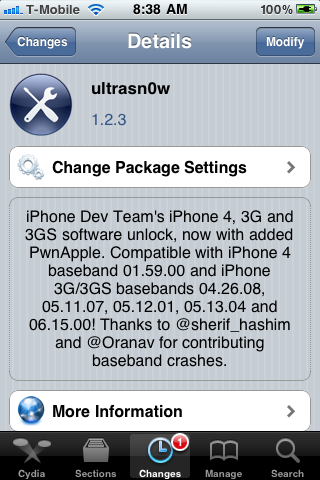
For you unlockers and jailbreakers, today the Dev Team has just released a version of UltraSnow that is compatible with iOS 5! So you can now unlock iOS 5 and use it with any provider. Check out the new features in iOS 5 here.

Just know that no new basebands are supported. The update only adds support for iOS 5. The iPhone 3G and 3GS basebands supported are 04.26.08, 05.11.07, 05.12.01, 05.13.04, and 06.15.00. The baseband supported for the iPhone 4 is 01.59.00.

Also know that the jailbreak is only a tethered jailbreak, except for those of you who have the 3GS that has the old bootrom. So that means, if your phone powers down, you’ll need to connect your phone to your computer when you boot back up.

I would also suggest saving your SHSH blobs before doing this using this tutorial:

http://www.iclarified.com/entry/index.php?enid=16988

Here is some more important info from the iPhone Dev Team Blog:

We’ve updated ultrasn0w to be compatible with iOS5, which came out a few days ago. While ultrasn0w 1.2.4 (available now in Cydia) doesn’t add support for any new basebands, the update is required for any ultrasn0w unlockers trying out iOS5 (it remains backwards compatible though, so you should be able to use it no matter what firmware you have).

Note: there’s a special “trick” that iPhone3GS owners with baseband 06.15 need for iOS5. During the new setup screens you see when you start iOS5 for the first time, you’ll be asked about Location Services. Be sure to select “Disable Location Services” when asked! Later on in the setup, you’ll have the chance to turn on Location Services again when asked if you want to use “Find my iPhone”. It’s fine to turn it back on at that point, if that’s your desire (or you can always go in and enable it in Settings.app).

Also, some iPhone3GS users with the 06.15 baseband may have tried to install iOS5 using a stock IPSW (even though you should never ever try to use a stock IPSW if you’re an ultrasn0w unlocker). If you did try this, your baseband is probably in an inconsistent state, and you’ll need to reflash the 06.15 baseband again (using redsn0w). Be very careful if you use redsn0w to reflash the iPad baseband – don’t interrupt the process! And please avoid using stock IPSWs in the future :) Unlockers should never go near stock IPSWs.

So if you qualify, and you don’t mind having a tethered jailbreak, then here are the three things that you want to do:

1. Upgrade to iOS 5 without upgrading your baseband

Tutorial: http://www.iclarified.com/entry/index.php?enid=17344

2. Jailbreak your iPhone

Again, this is a tethered jailbreak; the Dev team will be releasing an untethered jailbreak very soon, and I will post it on my blog when they do.

Tutorial: http://www.iclarified.com/entry/index.php?enid=17342

3. Unlock your iPhone (if need be)

Tutorial: http://www.iclarified.com/entry/index.php?enid=4253

I may or may not do this tethered jailbreak. It depends how much time I have. But once they release an untethered jailbreak, then I will definitely be upgrading to iOS 5, and when I do, I’ll record the process on video and post it.

And when they release an untethered jailbreak and unlock for the iPhone 4S, I will buy the iPhone 4S, record the jailbreaking and unlocking of it, and post that as well.

Enjoy iOS 5 and let me know what you think of it!

Match.com: #1 Dating Site – View Pics for Free


Los Angeles Computer Repair | Los Angeles Computer Tech | Computer Repair Services

Share:
Reading time: 3 min
Announcements•Apple•Breaking News•Cool Products & Services•iPad•iPhone & Mobile•iPhone Tips•Mobile•News

You Can Download iOS 5 Now! iCloud Update for Lion! BIG Apple Update Day!

October 12, 2011 by Ian Brown No Comments

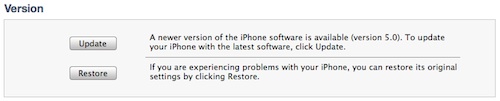
Apple has just released the latest version of their operating system for their iOS devices…iOS 5, and it’s now available for download! If you have an iPhone 3GS or 4, or a 3rd or 4th generation iPod, or either of the iPads, hook it up to your computer, open iTunes, click on your iOS device on the left under “Devices’, click update, and get rocking with the new iOS!
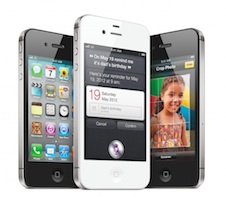
This is a really big update and has a plethora of new features, most notably an all new drop down notification system, iCloud (online storage and wireless syncing), iMessage (FREE text messaging and multi-media messaging among other iOS 5 users), lock screen access to your camera (can take pics immediately even if your screen is locked), major Twitter integration, Find My Friends (allows you to share you location with your friends, even just temporarily so they can give you directions, etc.), and an upgraded Safari browser, among others.

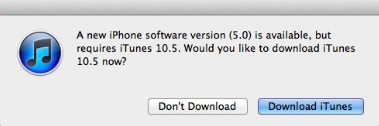
If you do not have at least iTunes 10.5, then you will need to do a software update to update iTunes first (Apple menu in upper left corner of your screen > Software Update).

Also being released today is an update to Mac OS X Lion, version 10.7.2, which includes support for iCloud.

To get the update, simply go to your Apple menu in the upper left corner of your screen and select Software Update. It will scan your computer and see what you need, and then list all of the updates. Just click the Update button and you’ll be good to go! Make sure you repair your disk permissions after you install the updates to keep you Mac running optimally.

So if you’re an Apple fan and have the devices to prove it, then go get downloading and enjoy!

Match.com: #1 Dating Site – View Pics for Free


Los Angeles Computer Repair | Los Angeles Computer Tech | Computer Repair Services

Share:
Reading time: 1 min
Announcements•Apple•Breaking News•Cool Products & Services•iPhone & Mobile•News•Video

ANNOUNCING The NEW Apple iPhone 4S [VIDEO]

October 4, 2011 by Ian Brown No Comments

Apple just announced the latest version of it’s iPhone, the iPhone 4S, and consequently their servers have been going down quite frequently today. I kept on getting an “Access Denied” error. Did you? Cleary the entire world is trying to see what the new iPhone 4S is bringing to the table.

Well, wait no longer! Here is the official Apple video telling you all about the new iPhone 4S, “The Most Amazing iPhone yet!”

[youtube]http://www.youtube.com/watch?v=XwPC5TkRGuo[/youtube]
If you want to watch the entire Keynote on the iPhone 4S, iOS 5, iCloud, and the new iPod Touch, go here:

Apple iPhone 4S Keynote

Match.com: #1 Dating Site – View Pics for Free


Los Angeles Computer Repair | Los Angeles Computer Tech | Computer Repair Services

Share:
Reading time: 1 min
Page 1 of 212»

FREE DOWNLOADS


Get immediate access to the first 315 pages of Nirvana Zarabi-Smith’s famous Quantum Encyclopedia book and get 10% OFF!

Click here!

LIMITED TIME ONLY!

Now compatible with iPad and Android tablets!


Get immediate access to the first 100 pages of the 6th edition of Nirvana Zarabi-Smith’s incredibly useful A-Z Protocols book and get 10% OFF!

Click here!

LIMITED TIME ONLY!

Now compatible with iPad and Android tablets!

25% OFF Biofeedback Certification Training!

Have you been yearning to get certified as a biofeedback professional? Would you like to deepen your biofeedback knowledge so you can get the most out of your device?

Then take advantage of this
LIMITED TIME OFFER of getting 25% OFF of Nirvana Zarabi-Smith’s amazing Biofeedback Certification Training Program!

Click here!

LIMITED TIME ONLY!

Recent Posts

Do you find personalized ads on your smartphone “creepy”?  Here’s how to opt-out.

Do you find personalized ads on your smartphone “creepy”? Here’s how to opt-out.

January 31, 2016
How to get rid of the annoying Windows 10 Free Upgrade notification

How to get rid of the annoying Windows 10 Free Upgrade notification

August 29, 2015
How to turn any song into a cool iPhone ringtone (mp3)

How to turn any song into a cool iPhone ringtone (mp3)

March 12, 2015
Is your Mac slow?  Here are the 6 top ways to speed up your Mac!

Is your Mac slow? Here are the 6 top ways to speed up your Mac!

February 6, 2015

Blog Post Categories

Archives

© 2020 copyright Ian Brown // All rights reserved