ianbrown.cc – computer tech & repair services – onsite and remote
  • Home
  • About Ian
  • Services
    • 10% Off Mobile Onsite Computer Repair – Greater Hartford, CT
  • Testimonials
  • Blog Archives
  • For Sale
  • Biofeedback Resources
    • + FREE DOWNLOAD
      The first 315 Pages of Nirvana Zarabi-Smith’s famous Quantum Encyclopedia ebook
      LIMITED TIME ONLY!
    • + FREE DOWNLOAD
      The first 100 pages of Nirvana Zarabi-Smith’s A-Z Protocols – INDIGO/SCIO ebook
      LIMITED TIME ONLY!
    • 25% Off Biofeedback Certification Courses at The Quantum Academies!
      LIMITED TIME ONLY!
  • Payments
  • Contact
Home
About Ian
Services
    10% Off Mobile Onsite Computer Repair – Greater Hartford, CT
Testimonials
Blog Archives
For Sale
Biofeedback Resources
    + FREE DOWNLOAD
The first 315 Pages of Nirvana Zarabi-Smith's famous Quantum Encyclopedia ebook
LIMITED TIME ONLY!

    + FREE DOWNLOAD
The first 100 pages of Nirvana Zarabi-Smith's A-Z Protocols – INDIGO/SCIO ebook
LIMITED TIME ONLY!

    25% Off Biofeedback Certification Courses at The Quantum Academies!
LIMITED TIME ONLY!

Payments
Contact
ianbrown.cc – computer tech & repair services – onsite and remote
  • Home
  • About Ian
  • Services
    • 10% Off Mobile Onsite Computer Repair – Greater Hartford, CT
  • Testimonials
  • Blog Archives
  • For Sale
  • Biofeedback Resources
    • + FREE DOWNLOAD
      The first 315 Pages of Nirvana Zarabi-Smith’s famous Quantum Encyclopedia ebook
      LIMITED TIME ONLY!
    • + FREE DOWNLOAD
      The first 100 pages of Nirvana Zarabi-Smith’s A-Z Protocols – INDIGO/SCIO ebook
      LIMITED TIME ONLY!
    • 25% Off Biofeedback Certification Courses at The Quantum Academies!
      LIMITED TIME ONLY!
  • Payments
  • Contact
Browsing Category
Cell Phone Tips
Android•Apple•Cell Phone Tips•iPad•iPhone & Mobile•iPhone Tips•Mobile

Do you find personalized ads on your smartphone “creepy”? Here’s how to opt-out.

January 31, 2016 by Ian Brown No Comments

Have you ever been using your smartphone…let’s say you’re using the eBay app…and you look for certain items on eBay. Then you close your eBay app without buying anything and you open another app. To your surprise, you see an ad for the very item you were just searching for on eBay!

Does that creep you out?

I, myself, find that a little creepy, like I’m being watched by “Big Brother” or something.

Luckily, there’s an easy and quick fix for this for both iOS (iPhone/iPad/iPod Touch) and Android devices.

However, please note that you’ll still see ads. They just won’t be for items that you’ve been looking at in other apps or on shopping websites.

Here’s how to fix it.

Continue reading
Share:
Reading time: 1 min
Apple•Cell Phone Tips•iPhone & Mobile•iPhone Tips•Tips and Tricks

How to turn any song into a cool iPhone ringtone (mp3)

March 12, 2015 by Ian Brown No Comments

Have you ever wanted to create your own ringtone for your iPhone, and not be limited to what’s available in the iTunes Store?

I’m with ya! I had a ringtone that I’ve used for a while, and I wanted to put it on my iPhone 6.

So I did a search and…voila!

Here’s how to do it:

Continue reading
Share:
Reading time: 2 min
Apple•Cell Phone Tips•Cool Products & Services•iPad•iPhone & Mobile•iPhone Tips

How to Charge Your iPhone Twice as Fast

November 20, 2013 by Ian Brown No Comments

A client of mine recently asked me why their iPad was charging so slowly. I asked him what he was using to charge it. He told me that he was using his iPhone charger.

“BINGO! That’s the reason!” I told him.

You see, the iPhone’s wall charger only has a 5W USB Power Adapter, whereas the iPad’s wall charger uses a 12W USB charger.
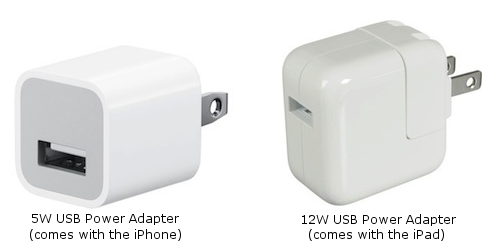
Charge your iPhone 2X as fast with the iPad's 12W USB Power Adapter!

Charge your iPhone 2X as fast with the iPad’s 12W USB Power Adapter!

So the iPad’s wall charger has over twice the charging power as the iPhone wall charger. Once he switched back to his iPad charger, its charging speed went back up to where it should be.

I then decided to switch that situation around and charge my iPhone with the iPad 12W USB charger.

Result?

BAMM! It charged twice as fast! So sweet!

Before I did that, I researched it to make sure it is safe to do, and it is.

So, if you want to charge your iPhone twice as fast when you plug it into the wall, simply get the Apple 12W USB Power Adapter.

You can use the same cord that came with your iPhone. Just take off the 5W USB charger on the end (see picture above), and replace it with the 12W USB charger (see picture above).

Or, if you have an iPad, you can use your iPad charger for your iPhone.

And it doesn’t matter if you have an iPhone 5 with a lightening connection and an iPad 3 with 30 pin connection, it will still work. Just put the 12W USB Power Adapter on the cord you will use to charge your iPhone.

A great tip for those busy professional types and for those who value time like I do. ;)

Match.com: #1 Dating Site – View Pics for Free

Los Angeles Computer Repair | Los Angeles Computer Tech | Computer Repair Services

Share:
Reading time: 1 min
Apple•Cell Phone Tips•iPhone & Mobile•iPhone Tips•Jailbreaking & Unlocking

How to find out the bootrom version of your iPhone [VIDEO]

November 5, 2011 by Ian Brown 1 Comment

Since the jailbreak for iOS 5 is still tethered, I wanted to find out if my iPhone 3GS had the old bootrom version or the new one. The old version will allow you to have an untethered jailbreak, which means you will NOT have to hook up your iPhone to your computer to keep the jailbreak every time you restart your iPhone, you turn it off, or it dies.

Watch the video below to see how to do it. And for those of you who would like the written instructions, I put them below the video.

Enjoy!

[youtube]http://www.youtube.com/watch?v=lcxyBKL1HZM[/youtube]

Instructions

  1. Connect your iPhone to your computer
  2. Turn iPhone off
  3. Start iTunes
  4. Hold Power and Home buttons together for 10 seconds or so
  5. Release Power button but keep holding the Home button until your computer recognizes a new USB device
  6. iTunes will now recognize your iPhone
  7. Note: Your iPhone screen at this time should be black (black in color), if not, then you are most likely in Recovery Mode, not DFU mode.

    Here’s a visual for you that shows the difference between “Recovery Mode” and “DFU Mode”:

  8. Click on the background image of your desktop (not an icon) OR click on “Finder” at the bottom of your screen in the dock, all the way to the left
  9. Click on “Go” at the top of your screen in the menu bar and select “Utilities”
  10. Double-click on “System Profiler”
  11. Click on USB on the left
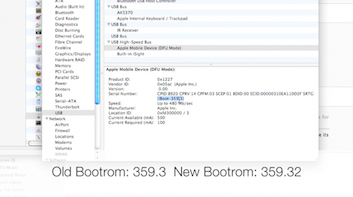
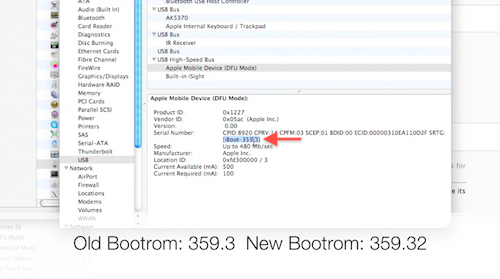
  12. On the right, you should see “Apple Mobile Device (DFU Mode).” Click on it.
  13. After you click on it, a new section should appear below it.
  14. You should see “Serial Number.” Right below the serial number, you should see [iBoot-359.3] or [iBoot-359.32]. The second one is the new bootrom. The first one is the old one.
  15. Done!

If you have the old bootrom, count yourself LUCKY! You can go and jailbreak/unlock your iPhone and it will be an untethered jailbreak, which means once you jailbreak it, it’s jailbroken. You will NOT need to hook up your iPhone to your computer every time your iPhone restarts or dies, which is what everyone else has to do as of now, until the iPhone Dev Team produces an untethered jailbreak for iOS 5.

Match.com: #1 Dating Site – View Pics for Free


Los Angeles Computer Repair | Los Angeles Computer Tech | Computer Repair Services
Share:
Reading time: 1 min
Page 1 of 3123»

FREE DOWNLOADS


Get immediate access to the first 315 pages of Nirvana Zarabi-Smith’s famous Quantum Encyclopedia book and get 10% OFF!

Click here!

LIMITED TIME ONLY!

Now compatible with iPad and Android tablets!


Get immediate access to the first 100 pages of the 6th edition of Nirvana Zarabi-Smith’s incredibly useful A-Z Protocols book and get 10% OFF!

Click here!

LIMITED TIME ONLY!

Now compatible with iPad and Android tablets!

25% OFF Biofeedback Certification Training!

Have you been yearning to get certified as a biofeedback professional? Would you like to deepen your biofeedback knowledge so you can get the most out of your device?

Then take advantage of this
LIMITED TIME OFFER of getting 25% OFF of Nirvana Zarabi-Smith’s amazing Biofeedback Certification Training Program!

Click here!

LIMITED TIME ONLY!

Recent Posts

Do you find personalized ads on your smartphone “creepy”?  Here’s how to opt-out.

Do you find personalized ads on your smartphone “creepy”? Here’s how to opt-out.

January 31, 2016
How to get rid of the annoying Windows 10 Free Upgrade notification

How to get rid of the annoying Windows 10 Free Upgrade notification

August 29, 2015
How to turn any song into a cool iPhone ringtone (mp3)

How to turn any song into a cool iPhone ringtone (mp3)

March 12, 2015
Is your Mac slow?  Here are the 6 top ways to speed up your Mac!

Is your Mac slow? Here are the 6 top ways to speed up your Mac!

February 6, 2015

Blog Post Categories

Archives

© 2020 copyright Ian Brown // All rights reserved