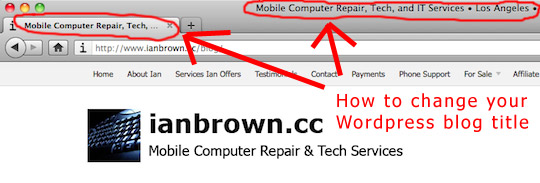
 Does the title of your WordPress home page not serve you or your business? Is it helping or hurting your ranking in Google? Does it even make sense when you read it? No?
Then you’ve come to the right place. Here are two options that will allow you to change it.
Update: According to some of the comments of the readers, Option #1 may not work any longer. I originally posted this back in 2008. I’ve added a second option which definitely works (I recently did it), and it’s super easy to do.
Option #1
- Log into your Administrator section (wp-admin)
- Go to DESIGN > THEME EDITOR (or PRESENTATION > THEME EDITOR in older versions of WordPress)
- On the RIGHT-HAND side where it says “[Your Theme’s Name] theme files”, find header.php or just Header and open it (click on it)
- Find this line:
 (click to enlarge)
 - Only change the word “Home” in two places: 1. To the right of “title=”, and 2. In between the brackets after that (e.g. >Home>)
- Change them to whatever you want your blog’s home page to be titled
- If you can’t save the change in Theme Editor, then either follow the link to The Codex beneath the window in which you are editing the file, or log into your server via FTP and change the “header.php” file in the folder of your current theme, which will be located in /public_html/wp-content/themes/yourcurrenttheme (“yourcurrenttheme” being the name of the theme you are currently using), if your WordPress install is in your root directory.

NOTE: If you want to be ranked high in Google and other search engines for the keywords that are related to your blog, then I highly suggest you put those keywords in your blog’s title. Just make sure that there is some order to the keywords, and that it makes sense. Do not put the keywords in the title randomly.
Option#2: Install the “All in One SEO” WordPress plugin
If Option#1 does not work for you, then simply install the WordPress plugin, All in One SEO, and follow the instructions below.
Instead of going to the plugin page above to install it, you can also just log into the Admin section of your blog, go to the DASHBOARD (which is where you should be when you first log in anyway), click on PLUGINS in the nav bar on the left, click on “Add new plugin” toward the top of the PLUGINS page, and then search for “All in One SEO” and install it.
After you install it, do this:
- Go to your DASHBOARD in the admin section of WordPress
- Scroll down to SETTINGS in the navigation bar on the left
- If you don’t see the different SETTINGS options listed below the word, “SETTINGS,” in the nav bar on the left, then click on the arrowhead to the right of the word SETTINGS in the nav bar to expand the list of SETTINGS OPTIONS
- Click on “All in One SEO” under SETTINGS in the nav bar on the left
- Once on the “All in One SEO” plugin page, scroll down past the ads, and look for “Home Title”
- Whatever you want to change the name of your home page to, type it in there, and then scroll down to the bottom of the page and click on “Update Options.”
NOTE: Again, as I stated above, you want to make sure you include the most popular and relevant keywords to your business in the title of your homepage, as Google rates the words that are in the title of your home page VERY highly when deciding the ranking of your blog in its search results. Choose wisely, and make sure you put your keywords in an order that makes sense. Don’t just randomly list the keywords in your home page title. Make a phrase out of them that makes sense.
Once you do that, you should be good to go! Open up your blog home page in Firefox and look at the very top of the browser. You should see your new home page title there!
SEO TIP
Once you update your blog’s home page title, you need to tell Google about it so you don’t have to wait for Google’s bots to crawl your site to see the update. Simply go here and enter the URL of your blog’s homepage to speed up the process (e.g. http://www.yourblog.com; be sure and include the “http://”):
Submit the URL of your blog to Google here.
Match.com: #1 Dating Site – View Pics for Free
Los Angeles Computer Repair | Los Angeles Computer Tech | Computer Repair Services






