
ianbrown.cc – computer tech & repair services – onsite and remote
  • Home
  • About Ian
  • Services
    • 10% Off Mobile Onsite Computer Repair – Greater Hartford, CT
  • Testimonials
  • Blog Archives
  • For Sale
  • Biofeedback Resources
    • + FREE DOWNLOAD
      The first 315 Pages of Nirvana Zarabi-Smith’s famous Quantum Encyclopedia ebook
      LIMITED TIME ONLY!
    • + FREE DOWNLOAD
      The first 100 pages of Nirvana Zarabi-Smith’s A-Z Protocols – INDIGO/SCIO ebook
      LIMITED TIME ONLY!
    • 25% Off Biofeedback Certification Courses at The Quantum Academies!
      LIMITED TIME ONLY!
  • Payments
  • Contact
Home
About Ian
Services
    10% Off Mobile Onsite Computer Repair – Greater Hartford, CT
Testimonials
Blog Archives
For Sale
Biofeedback Resources
    + FREE DOWNLOAD
The first 315 Pages of Nirvana Zarabi-Smith's famous Quantum Encyclopedia ebook
LIMITED TIME ONLY!

    + FREE DOWNLOAD
The first 100 pages of Nirvana Zarabi-Smith's A-Z Protocols – INDIGO/SCIO ebook
LIMITED TIME ONLY!

    25% Off Biofeedback Certification Courses at The Quantum Academies!
LIMITED TIME ONLY!

Payments
Contact
ianbrown.cc – computer tech & repair services – onsite and remote
  • Home
  • About Ian
  • Services
    • 10% Off Mobile Onsite Computer Repair – Greater Hartford, CT
  • Testimonials
  • Blog Archives
  • For Sale
  • Biofeedback Resources
    • + FREE DOWNLOAD
      The first 315 Pages of Nirvana Zarabi-Smith’s famous Quantum Encyclopedia ebook
      LIMITED TIME ONLY!
    • + FREE DOWNLOAD
      The first 100 pages of Nirvana Zarabi-Smith’s A-Z Protocols – INDIGO/SCIO ebook
      LIMITED TIME ONLY!
    • 25% Off Biofeedback Certification Courses at The Quantum Academies!
      LIMITED TIME ONLY!
  • Payments
  • Contact
Browsing Category
Archive
Beta Testing•Beta Testing•Cool Products & Services•Google+•Social Media•Tech News

What is Google+? Is it a Facebook and Twitter killer? Here’s an overview. Want an invite?

August 1, 2011 by Ian Brown 2 Comments

Have you heard of Google+?

You can find it here: http://plus.google.com.

It’s Google’s version of Facebook and Twitter, combined into one, and it’s actually pretty cool.

It allows you to share photos, videos, have unlimited text in your status updates, and other features that are similar to Facebook and Twitter (sans the unlimited text in the status updates).

Here is Google’s overview of its new social network:

The Google+ Project: A quick look
[youtube]http://www.youtube.com/watch?v=xwnJ5Bl4kLI[/youtube]

The Google+ Project: Explore Settings
[youtube]http://www.youtube.com/watch?v=vnv1Mbj1jKw[/youtube]
Aside from the similarities it has to Facebook and Twitter, there are some very unique features that Google has come up with…

HANGOUTS

One really cool feature G+ has that Facebook and Twitter do not is called “Hangouts.” This is where you can have a group video conference call of up to 10 people! That’s pretty sweet. And a buddy of mine said the quality is great.

Facebook has rolled out video calling via Skype, although it does not support group chat yet. So G+ definitely has 1 up, or should I say 10 up, on Facebook on this one!

The Google+ Project: Hangouts
[youtube]http://www.youtube.com/watch?v=Tku1vJeuzH4&NR=1[/youtube]

The Google+ Project: Explore Hangouts
[youtube]http://www.youtube.com/watch?v=QN38vHZjWXw[/youtube]
CIRCLES

Circles allows you to put people you know in certain groups. So you can have your family in one Circle, your co-workers in another Circle, your business contacts in another Circle, your clients in another Circle, and maybe people you’re “following” (a la Twitter) in another Circle (more on the “following” concept later).

This allows you to group your contacts, which is very helpful, as you’ll see.

For example, clicking your family Circle allows you to only view the status updates of people in your family. Likewise, if you want to check out what your co-workers are talking about, you can click on your co-workers circle.

SHARE YOUR CONTENT WITH CERTAIN PEOPLE IN YOUR NETWORK

G+ also allows you to do another cool thing, which you can’t really do in Facebook. You can, but it is a bit clunky, and you have to go through a lot more hoops to share your content with groups of people, especially in the initial setup of it.

In Google+, you can easily share your status updates, which includes photos, videos, links, etc., with just certain Circles of yours, or with just one Circle, or with just one person, or with just certain people.

So if you have pictures from your family outing that you only want your family to see, then simply opt to only share it with your family Circle. That’s yet another feature which Facebook definitely needs to make easier to use if they want to be able to compete with G+.

CAN I SHARE MY CONTENT WITH EVERYONE, EVEN THOSE NOT IN MY CIRCLES?

If you want to share a status update (or picture or link or video, etc) with anyone and everyone, including those who aren’t even in your circles or who you even know, then you can select to share whatever you’re sharing with the ‘Public.’

Google definitely nailed it with Circles.

The Google+ Project: Circles
[youtube]http://www.youtube.com/watch?v=BeMZP-oyOII[/youtube]

The Google+ Project: Explore Circles
[youtube]http://www.youtube.com/watch?v=ocPeAdpe_A8[/youtube]

SPARKS

There is also a feature called “Sparks.” This is where you can create streams of news articles, videos, pictures, etc., that are being shared on the Internet and organize them by topic.

So if you want to see all of the news that’s being shared a lot related to the upcoming iPhone 5, you can do that.

And if you want to see all of the news that’s being shared related to raw food recipes, you can do that as well.

It’s a great way to sift through information overload, because the articles, videos, and blog posts that are being shared by many many people are obviously of high quality.

The Google+ Project: Sparks
[youtube]http://www.youtube.com/watch?v=MRkAdTflltc[/youtube]

The Google+ Project: Explore Sparks
[youtube]http://www.youtube.com/watch?v=0DoAl4JXhQo[/youtube]

MOBILE

Google+ now has an app for both Android phones and the iPhone. They both have the following features: Stream (it’s like your homepage on Facebook where you see all of the postings of whatever Circle you’ve selected, or you can select to see them all), Huddle, Photos, Profile, Circles. The only difference right now between the Android App and the iPhone app is the Android app has the INSTANT UPLOAD feature (see below). Both are great apps and work very well. Very stable so far, as expected from Google.

[youtube]http://www.youtube.com/watch?v=N8gvHaX1cwY[/youtube]

INSTANT UPLOAD

This is a feature specifically for Android smart phones at the moment. There is an iPhone app for G+ now, however, it does not have this feature.

Instant Upload allows you to upload every picture and video you take with your Android smart phone to a private photo album in your G+ account. This way, all you have to do is decide who to share it with once it’s uploaded.

It takes the hassle of syncing your phone with your computer to get the photos and videos from your phone on to your computer, then uploading them from your computer to the Internet…out of the equation. This feature does all of that for you automatically.

The Google+ Project: Instant Upload
[youtube]http://www.youtube.com/watch?v=6y_xKVSRAy8[/youtube]

HUDDLE

Huddle is a cool way to be able to group text with your friends (or group instant message if you prefer that term).

In Huddle, which is a feature in both the Android and iPhone G+ app, you can all text in the same conversation so everyone in the group can see everyone else’s texts. It’s great for organizing a night out on the town, or for setting up a mastermind meeting.

The Google+ Project: Huddle
[youtube]http://www.youtube.com/watch?v=iA22daAstNg[/youtube]

MORE GOOGLE +1 BUTTON LOVE FOR YOUR WEBSITE (HUGE!)

Here’s a BIG reason to join G+ if you have a website. First, you’ll need to add the Google +1 Button to your website. Then, every time you share a link to a blog post that you made, or a new web page that you created, you can share it on G+ and get some more +1 love from your friends, colleagues and followers.

On G+, it’s as easy to +1 a link as it is to “Like” a link on Facebook. This will help increase the ranking of your website in Google, which will push it higher up in the search results.

And if things go the way the industry says it’s going to go (they’re saying that Google is going to place a lot more weight on the number of +1’s a page/website has in determining the page rank), then this is going to be a HUGE game changer, especially if you have 100,000 people “following” you on G+ whom you’re sharing your website links to, which is a great lead-in to my last topic on G+.

Google Business: Introducing the +1 Button
[youtube]http://www.youtube.com/watch?v=4RyY2-ofP4g[/youtube]

And if you want a more indepth look at the +1 button. Check out the video below. I watched the first five minutes, and it definitely seems like a worth while watch if you really want a good understanding of what the +1 button is, and what it can do for your website. Plus it only has 1 dislike (probably from a Facebook fan), so it must be good.

Google I/O 2011: An introduction to the +1 button
[youtube]http://www.youtube.com/watch?v=Fl3c79n_wRg[/youtube]

WHAT DO YOU MEAN PEOPLE CAN “FOLLOW” ME ON GOOGLE+?

This is where Google+ acts like Twitter. Yes, people can follow your posts just like they can on Twitter, and you don’t have to approve them for them to be able to follow you. They can just follow you (you can block them if you want, though). They can put you in any of their Circles that they wish. They can even put you in more than one Circle (Friends Circle and Business Circle, for example).

The thing that is different from Twitter is that when someone follows you, their posts are put into a stream of yours called “Incoming.” So if you want to see the posts of people who are following you, all you have to do is click on your “Incoming” stream and voila! You get to see what your followers are up to.

WANT AN INVITE?

So now that you have a pretty good idea what Google+ is about, do you want an invite so you can check it out? With products like Google+, you can only do so much research before you realize that you actually have to experience it to really know it.

So if you want an invite so you can experience Google+, send me an email with “Google+ Invite Request” in the subject line, and I’ll send one right over to you. Please note that I can only send out a certain amount per day. So if you don’t get an invite on the same day, be patient. I will get to you within a few days after you request it.

Have any comments, opinions or experiences with Google+? Think it’s a Facebook or Twitter killer? Leave a comment below and tell me what you think!

Match.com: #1 Dating Site – View Pics for Free


Los Angeles Computer Repair | Los Angeles Computer Tech | Computer Repair Services
Share:
Reading time: 8 min
PC•Software•Spyware, Malware, Browser Hijacking, etc.•Viruses•Viruses, Spyware & Malware•Windows 7

Has your computer slowed down dramatically after installing Microsoft Security Essentials?

July 27, 2011 by Ian Brown No Comments

Did you recently install Microsoft Security Essentials to protect your computer, and right after installing it, your computer slowed to a crawl? Well, the good news is, you’re not going crazy. It is completely possible for this to happen.

Why? Because for some reason, Microsoft made it so that if you are running MSE on Windows XP, MSE only needs 256MB of RAM to run. BUT (and that’s a BIG BUT!), if you’re running Windows Vista or Windows 7, then MSE requires a whopping 1GB of RAM! That’s how much RAM a lot of people have in their whole system, which means there would not be any RAM left to run the OS, never mind run any additional programs.

Windows 7 alone needs 1GB of RAM to run. So if you have WSE installed or want to have it installed, then you need at least 2GB of RAM just to run WSE and Windows 7!

Since that’s the case, if you’re running Windows 7 or Windows Vista, make sure you have at least 3GB of RAM, preferably 4GB, if you want to have MSE as your security suite.

Just a little FYI for ya!

Here’s the page you want to go to to confirm the system requirements for MSE:
System requirements for Microsoft Security Essentials


Los Angeles Computer Repair | Los Angeles Computer Tech | Computer Repair Services
Share:
Reading time: 1 min
PayPal•Tips and Tricks

How to add the ability to accept donations to your website or blog, or request donations via email, via PayPal without the donors having to sign up for PayPal

July 4, 2011 by Ian Brown 8 Comments

Do you want to add the ability for people to donate money to your cause, your website, or you? Want to use PayPal to do it? Want to set it up so that the donors can donate via their credit or debit card without having to sign up for PayPal?

It’s easier than you might think.

Just do this:

  1. Log into your PayPal account
  2. Click on the “Merchant Services” tab
  3. Click on the “Donate” link under the “Create Buttons” section
  4. Choose button type
  5. Enter “Organization name/service” (enter your name if it’s for you)
  6. Click on the “Customize text or appearance” link if you want to change how your “Donate” button is going to look
  7. Select currency (ex. USD = US Dollar)
  8. Select whether you want your donors to enter their own contribution amount, or if you want them to contribute a fixed amount.
  9. Select whether you want to use your secure merchant account ID (recommended) or your primary email address
  10. Click the triangle to the left of Step 2 (another section of the form will drop down)
  11. Check the box if you want to save your PayPal button for future use or to use as a template
  12. Click on the triangle next to Step 3
  13. Select whether or not you want the donor to have the ability to write a note to you that would be sent along with their donation
  14. Select whether or not you need the donor’s shipping address
  15. Check the box if you have a custom web page that you or your designer made that the donor would be sent to if they cancel their checkout (most likely you won’t have this, so skip it)
  16. Check the box if you have a custom web page that the donors will be sent to when they finish checkout (again, you probably won’t have this)
  17. Click the orange “Create Button” button
  18. 18. Determine if you want to use the code for your website, or if you want a link that you can email (of course, you can use both, if you want).
  19. Click on the corresponding tab of the one you want to use
  20. Click the “Select Code” button beneath it (this will highlight the code)
  21. RIGHT-click on the highlighted code (or, on your Mac, if you don’t have a mouse, hold down your CTRL key and click on it) and select COPY
  22. Then either paste it in an email if you copied the email link, or paste it into a “Text” widget if you’re putting a “Donate” button on your WordPress blog. To “paste” the code, RIGHT-click (CTRL-click for Mac if no mouse) in the space where you want to paste it and select PASTE.

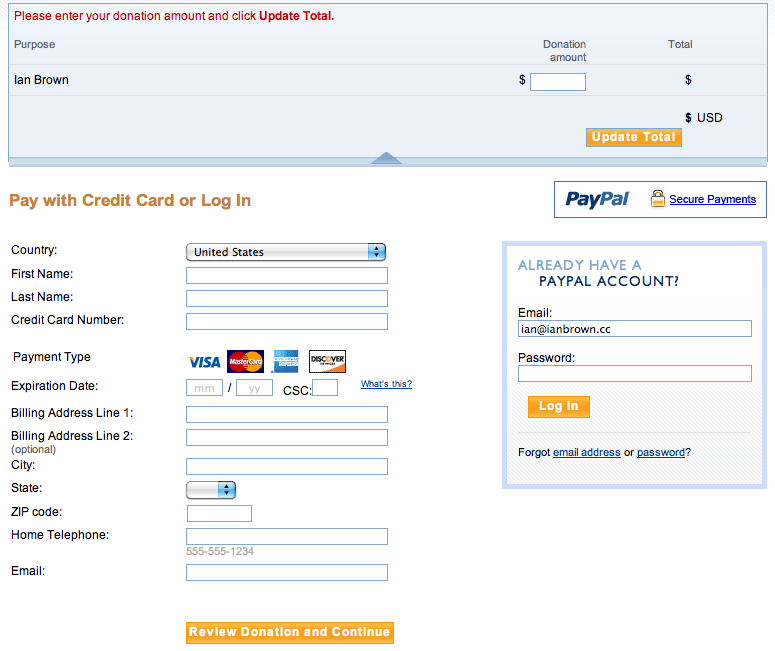
When the donor clicks on either the email link or the donate button, they will be taken to a PayPal page where they can enter the amount they’d like to donate (if you opted to allow them to choose the amount). Below that, it will ask them to sign in to PayPal.

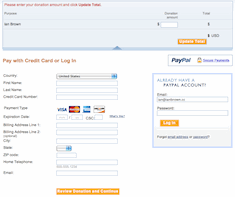
However, to the left of where the would sign into PayPal, there is section entitled, “Don’t have a PayPal account?” They can click on the “Continue” link in that section, and it will open up a section where they can enter their info and credit/debit card info (see image below).

NOTE: It should NOT ask them to create a PayPal password at the bottom of the form. The form should only ask for their country, name, address, phone number, credit/debit card info, and email address (see above image).

After they enter their info, they can just click on the “Review Donation and Continue” button, review the info they entered, and then click the “Donate” button.

That should be it!

To check out what the page should look like after you create the button and/or email link, click on the link below:

https://www.paypal.com/cgi-bin/webscr?cmd=_s-xclick&hosted_button_id=8F4XP2Y5X7MBC

Feel free to test it by sending me a donation! ;)

Los Angeles Computer Repair | Los Angeles Computer Tech | Computer Repair Services
Share:
Reading time: 3 min
Apple•For Sale•iPhone•iPhone & Mobile

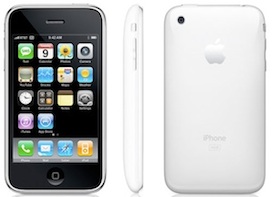
FOR SALE on eBay: New White iPhone 3GS 16GB ATT

June 30, 2011 by Ian Brown 1 Comment

The battery on my mother’s old white iPhone 3GS 16GB died. So we went to the Apple store and bought a replacement phone. So now we have a brand new white iPhone 3GS 16GB with ATT that we just put up on eBay. It comes with a case and a 90 day warranty with Apple. You can check it out here.

The eBay auction for this phone ends this Sunday, July 3rd, 2011. So go now and bid on it while you’re thinking of it. Not much time left! Go here.

UPDATE: Sold!

Los Angeles Computer Repair | Los Angeles Computer Tech | Computer Repair Services
Share:
Reading time: 1 min
Page 9 of 58« First...«891011»203040...Last »

FREE DOWNLOADS


Get immediate access to the first 315 pages of Nirvana Zarabi-Smith’s famous Quantum Encyclopedia book and get 10% OFF!

Click here!

LIMITED TIME ONLY!

Now compatible with iPad and Android tablets!


Get immediate access to the first 100 pages of the 6th edition of Nirvana Zarabi-Smith’s incredibly useful A-Z Protocols book and get 10% OFF!

Click here!

LIMITED TIME ONLY!

Now compatible with iPad and Android tablets!

25% OFF Biofeedback Certification Training!

Have you been yearning to get certified as a biofeedback professional? Would you like to deepen your biofeedback knowledge so you can get the most out of your device?

Then take advantage of this
LIMITED TIME OFFER of getting 25% OFF of Nirvana Zarabi-Smith’s amazing Biofeedback Certification Training Program!

Click here!

LIMITED TIME ONLY!

Recent Posts

Do you find personalized ads on your smartphone “creepy”?  Here’s how to opt-out.

Do you find personalized ads on your smartphone “creepy”? Here’s how to opt-out.

January 31, 2016
How to get rid of the annoying Windows 10 Free Upgrade notification

How to get rid of the annoying Windows 10 Free Upgrade notification

August 29, 2015
How to turn any song into a cool iPhone ringtone (mp3)

How to turn any song into a cool iPhone ringtone (mp3)

March 12, 2015
Is your Mac slow?  Here are the 6 top ways to speed up your Mac!

Is your Mac slow? Here are the 6 top ways to speed up your Mac!

February 6, 2015

Blog Post Categories

Archives

© 2020 copyright Ian Brown // All rights reserved





