ianbrown.cc – computer tech & repair services – onsite and remote
  • Home
  • About Ian
  • Services
    • 10% Off Mobile Onsite Computer Repair – Greater Hartford, CT
  • Testimonials
  • Blog Archives
  • For Sale
  • Biofeedback Resources
    • + FREE DOWNLOAD
      The first 315 Pages of Nirvana Zarabi-Smith’s famous Quantum Encyclopedia ebook
      LIMITED TIME ONLY!
    • + FREE DOWNLOAD
      The first 100 pages of Nirvana Zarabi-Smith’s A-Z Protocols – INDIGO/SCIO ebook
      LIMITED TIME ONLY!
    • 25% Off Biofeedback Certification Courses at The Quantum Academies!
      LIMITED TIME ONLY!
  • Payments
  • Contact
Home
About Ian
Services
    10% Off Mobile Onsite Computer Repair – Greater Hartford, CT
Testimonials
Blog Archives
For Sale
Biofeedback Resources
    + FREE DOWNLOAD
The first 315 Pages of Nirvana Zarabi-Smith's famous Quantum Encyclopedia ebook
LIMITED TIME ONLY!

    + FREE DOWNLOAD
The first 100 pages of Nirvana Zarabi-Smith's A-Z Protocols – INDIGO/SCIO ebook
LIMITED TIME ONLY!

    25% Off Biofeedback Certification Courses at The Quantum Academies!
LIMITED TIME ONLY!

Payments
Contact
ianbrown.cc – computer tech & repair services – onsite and remote
  • Home
  • About Ian
  • Services
    • 10% Off Mobile Onsite Computer Repair – Greater Hartford, CT
  • Testimonials
  • Blog Archives
  • For Sale
  • Biofeedback Resources
    • + FREE DOWNLOAD
      The first 315 Pages of Nirvana Zarabi-Smith’s famous Quantum Encyclopedia ebook
      LIMITED TIME ONLY!
    • + FREE DOWNLOAD
      The first 100 pages of Nirvana Zarabi-Smith’s A-Z Protocols – INDIGO/SCIO ebook
      LIMITED TIME ONLY!
    • 25% Off Biofeedback Certification Courses at The Quantum Academies!
      LIMITED TIME ONLY!
  • Payments
  • Contact
Browsing Tag
unlock iphone
Apple•Cell Phone Tips•iPhone & Mobile•iPhone Tips•Jailbreaking & Unlocking

How to find out the bootrom version of your iPhone [VIDEO]

November 5, 2011 by Ian Brown 1 Comment

Since the jailbreak for iOS 5 is still tethered, I wanted to find out if my iPhone 3GS had the old bootrom version or the new one. The old version will allow you to have an untethered jailbreak, which means you will NOT have to hook up your iPhone to your computer to keep the jailbreak every time you restart your iPhone, you turn it off, or it dies.

Watch the video below to see how to do it. And for those of you who would like the written instructions, I put them below the video.

Enjoy!

[youtube]http://www.youtube.com/watch?v=lcxyBKL1HZM[/youtube]

Instructions

  1. Connect your iPhone to your computer
  2. Turn iPhone off
  3. Start iTunes
  4. Hold Power and Home buttons together for 10 seconds or so
  5. Release Power button but keep holding the Home button until your computer recognizes a new USB device
  6. iTunes will now recognize your iPhone
  7. Note: Your iPhone screen at this time should be black (black in color), if not, then you are most likely in Recovery Mode, not DFU mode.

    Here’s a visual for you that shows the difference between “Recovery Mode” and “DFU Mode”:

  8. Click on the background image of your desktop (not an icon) OR click on “Finder” at the bottom of your screen in the dock, all the way to the left
  9. Click on “Go” at the top of your screen in the menu bar and select “Utilities”
  10. Double-click on “System Profiler”
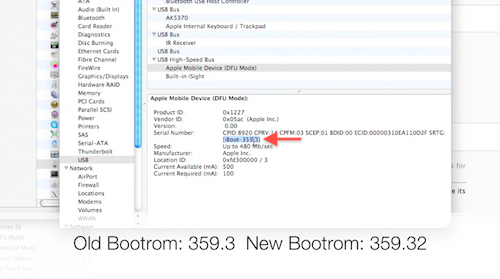
  11. Click on USB on the left
  12. On the right, you should see “Apple Mobile Device (DFU Mode).” Click on it.
  13. After you click on it, a new section should appear below it.
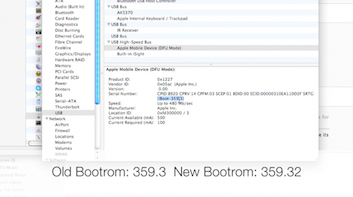
  14. You should see “Serial Number.” Right below the serial number, you should see [iBoot-359.3] or [iBoot-359.32]. The second one is the new bootrom. The first one is the old one.
  15. Done!

If you have the old bootrom, count yourself LUCKY! You can go and jailbreak/unlock your iPhone and it will be an untethered jailbreak, which means once you jailbreak it, it’s jailbroken. You will NOT need to hook up your iPhone to your computer every time your iPhone restarts or dies, which is what everyone else has to do as of now, until the iPhone Dev Team produces an untethered jailbreak for iOS 5.

Match.com: #1 Dating Site – View Pics for Free


Los Angeles Computer Repair | Los Angeles Computer Tech | Computer Repair Services
Share:
Reading time: 1 min
Breaking News•Cool Products & Services•iPhone & Mobile•iPhone Tips•Mobile•News•Tips and Tricks

iOS 5 can now be jailbroken AND unlocked!

October 14, 2011 by Ian Brown No Comments

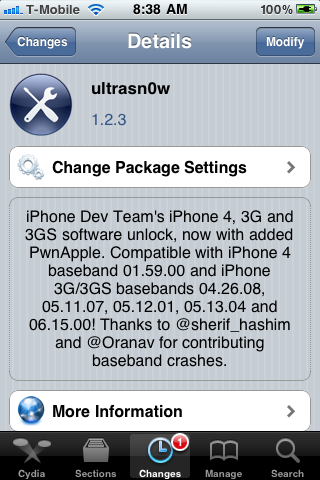
For you unlockers and jailbreakers, today the Dev Team has just released a version of UltraSnow that is compatible with iOS 5! So you can now unlock iOS 5 and use it with any provider. Check out the new features in iOS 5 here.

Just know that no new basebands are supported. The update only adds support for iOS 5. The iPhone 3G and 3GS basebands supported are 04.26.08, 05.11.07, 05.12.01, 05.13.04, and 06.15.00. The baseband supported for the iPhone 4 is 01.59.00.

Also know that the jailbreak is only a tethered jailbreak, except for those of you who have the 3GS that has the old bootrom. So that means, if your phone powers down, you’ll need to connect your phone to your computer when you boot back up.

I would also suggest saving your SHSH blobs before doing this using this tutorial:

http://www.iclarified.com/entry/index.php?enid=16988

Here is some more important info from the iPhone Dev Team Blog:

We’ve updated ultrasn0w to be compatible with iOS5, which came out a few days ago. While ultrasn0w 1.2.4 (available now in Cydia) doesn’t add support for any new basebands, the update is required for any ultrasn0w unlockers trying out iOS5 (it remains backwards compatible though, so you should be able to use it no matter what firmware you have).

Note: there’s a special “trick” that iPhone3GS owners with baseband 06.15 need for iOS5. During the new setup screens you see when you start iOS5 for the first time, you’ll be asked about Location Services. Be sure to select “Disable Location Services” when asked! Later on in the setup, you’ll have the chance to turn on Location Services again when asked if you want to use “Find my iPhone”. It’s fine to turn it back on at that point, if that’s your desire (or you can always go in and enable it in Settings.app).

Also, some iPhone3GS users with the 06.15 baseband may have tried to install iOS5 using a stock IPSW (even though you should never ever try to use a stock IPSW if you’re an ultrasn0w unlocker). If you did try this, your baseband is probably in an inconsistent state, and you’ll need to reflash the 06.15 baseband again (using redsn0w). Be very careful if you use redsn0w to reflash the iPad baseband – don’t interrupt the process! And please avoid using stock IPSWs in the future :) Unlockers should never go near stock IPSWs.

So if you qualify, and you don’t mind having a tethered jailbreak, then here are the three things that you want to do:

1. Upgrade to iOS 5 without upgrading your baseband

Tutorial: http://www.iclarified.com/entry/index.php?enid=17344

2. Jailbreak your iPhone

Again, this is a tethered jailbreak; the Dev team will be releasing an untethered jailbreak very soon, and I will post it on my blog when they do.

Tutorial: http://www.iclarified.com/entry/index.php?enid=17342

3. Unlock your iPhone (if need be)

Tutorial: http://www.iclarified.com/entry/index.php?enid=4253

I may or may not do this tethered jailbreak. It depends how much time I have. But once they release an untethered jailbreak, then I will definitely be upgrading to iOS 5, and when I do, I’ll record the process on video and post it.

And when they release an untethered jailbreak and unlock for the iPhone 4S, I will buy the iPhone 4S, record the jailbreaking and unlocking of it, and post that as well.

Enjoy iOS 5 and let me know what you think of it!

Match.com: #1 Dating Site – View Pics for Free


Los Angeles Computer Repair | Los Angeles Computer Tech | Computer Repair Services
Share:
Reading time: 3 min

FREE DOWNLOADS


Get immediate access to the first 315 pages of Nirvana Zarabi-Smith’s famous Quantum Encyclopedia book and get 10% OFF!

Click here!

LIMITED TIME ONLY!

Now compatible with iPad and Android tablets!


Get immediate access to the first 100 pages of the 6th edition of Nirvana Zarabi-Smith’s incredibly useful A-Z Protocols book and get 10% OFF!

Click here!

LIMITED TIME ONLY!

Now compatible with iPad and Android tablets!

25% OFF Biofeedback Certification Training!

Have you been yearning to get certified as a biofeedback professional? Would you like to deepen your biofeedback knowledge so you can get the most out of your device?

Then take advantage of this
LIMITED TIME OFFER of getting 25% OFF of Nirvana Zarabi-Smith’s amazing Biofeedback Certification Training Program!

Click here!

LIMITED TIME ONLY!

Recent Posts

Do you find personalized ads on your smartphone “creepy”?  Here’s how to opt-out.

Do you find personalized ads on your smartphone “creepy”? Here’s how to opt-out.

January 31, 2016
How to get rid of the annoying Windows 10 Free Upgrade notification

How to get rid of the annoying Windows 10 Free Upgrade notification

August 29, 2015
How to turn any song into a cool iPhone ringtone (mp3)

How to turn any song into a cool iPhone ringtone (mp3)

March 12, 2015
Is your Mac slow?  Here are the 6 top ways to speed up your Mac!

Is your Mac slow? Here are the 6 top ways to speed up your Mac!

February 6, 2015

Blog Post Categories

Archives

© 2020 copyright Ian Brown // All rights reserved