ianbrown.cc – computer tech & repair services – onsite and remote
  • Home
  • About Ian
  • Services
    • 10% Off Mobile Onsite Computer Repair – Greater Hartford, CT
  • Testimonials
  • Blog Archives
  • For Sale
  • Biofeedback Resources
    • + FREE DOWNLOAD
      The first 315 Pages of Nirvana Zarabi-Smith’s famous Quantum Encyclopedia ebook
      LIMITED TIME ONLY!
    • + FREE DOWNLOAD
      The first 100 pages of Nirvana Zarabi-Smith’s A-Z Protocols – INDIGO/SCIO ebook
      LIMITED TIME ONLY!
    • 25% Off Biofeedback Certification Courses at The Quantum Academies!
      LIMITED TIME ONLY!
  • Payments
  • Contact
Home
About Ian
Services
    10% Off Mobile Onsite Computer Repair – Greater Hartford, CT
Testimonials
Blog Archives
For Sale
Biofeedback Resources
    + FREE DOWNLOAD
The first 315 Pages of Nirvana Zarabi-Smith's famous Quantum Encyclopedia ebook
LIMITED TIME ONLY!

    + FREE DOWNLOAD
The first 100 pages of Nirvana Zarabi-Smith's A-Z Protocols – INDIGO/SCIO ebook
LIMITED TIME ONLY!

    25% Off Biofeedback Certification Courses at The Quantum Academies!
LIMITED TIME ONLY!

Payments
Contact
ianbrown.cc – computer tech & repair services – onsite and remote
  • Home
  • About Ian
  • Services
    • 10% Off Mobile Onsite Computer Repair – Greater Hartford, CT
  • Testimonials
  • Blog Archives
  • For Sale
  • Biofeedback Resources
    • + FREE DOWNLOAD
      The first 315 Pages of Nirvana Zarabi-Smith’s famous Quantum Encyclopedia ebook
      LIMITED TIME ONLY!
    • + FREE DOWNLOAD
      The first 100 pages of Nirvana Zarabi-Smith’s A-Z Protocols – INDIGO/SCIO ebook
      LIMITED TIME ONLY!
    • 25% Off Biofeedback Certification Courses at The Quantum Academies!
      LIMITED TIME ONLY!
  • Payments
  • Contact
Browsing Tag
how to add donate button to website
PayPal•Tips and Tricks

How to add the ability to accept donations to your website or blog, or request donations via email, via PayPal without the donors having to sign up for PayPal

July 4, 2011 by Ian Brown 8 Comments

Do you want to add the ability for people to donate money to your cause, your website, or you? Want to use PayPal to do it? Want to set it up so that the donors can donate via their credit or debit card without having to sign up for PayPal?

It’s easier than you might think.

Just do this:

  1. Log into your PayPal account
  2. Click on the “Merchant Services” tab
  3. Click on the “Donate” link under the “Create Buttons” section
  4. Choose button type
  5. Enter “Organization name/service” (enter your name if it’s for you)
  6. Click on the “Customize text or appearance” link if you want to change how your “Donate” button is going to look
  7. Select currency (ex. USD = US Dollar)
  8. Select whether you want your donors to enter their own contribution amount, or if you want them to contribute a fixed amount.
  9. Select whether you want to use your secure merchant account ID (recommended) or your primary email address
  10. Click the triangle to the left of Step 2 (another section of the form will drop down)
  11. Check the box if you want to save your PayPal button for future use or to use as a template
  12. Click on the triangle next to Step 3
  13. Select whether or not you want the donor to have the ability to write a note to you that would be sent along with their donation
  14. Select whether or not you need the donor’s shipping address
  15. Check the box if you have a custom web page that you or your designer made that the donor would be sent to if they cancel their checkout (most likely you won’t have this, so skip it)
  16. Check the box if you have a custom web page that the donors will be sent to when they finish checkout (again, you probably won’t have this)
  17. Click the orange “Create Button” button
  18. 18. Determine if you want to use the code for your website, or if you want a link that you can email (of course, you can use both, if you want).
  19. Click on the corresponding tab of the one you want to use
  20. Click the “Select Code” button beneath it (this will highlight the code)
  21. RIGHT-click on the highlighted code (or, on your Mac, if you don’t have a mouse, hold down your CTRL key and click on it) and select COPY
  22. Then either paste it in an email if you copied the email link, or paste it into a “Text” widget if you’re putting a “Donate” button on your WordPress blog. To “paste” the code, RIGHT-click (CTRL-click for Mac if no mouse) in the space where you want to paste it and select PASTE.

When the donor clicks on either the email link or the donate button, they will be taken to a PayPal page where they can enter the amount they’d like to donate (if you opted to allow them to choose the amount). Below that, it will ask them to sign in to PayPal.

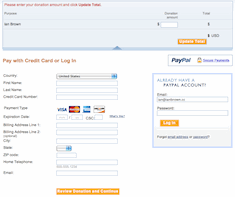
However, to the left of where the would sign into PayPal, there is section entitled, “Don’t have a PayPal account?” They can click on the “Continue” link in that section, and it will open up a section where they can enter their info and credit/debit card info (see image below).
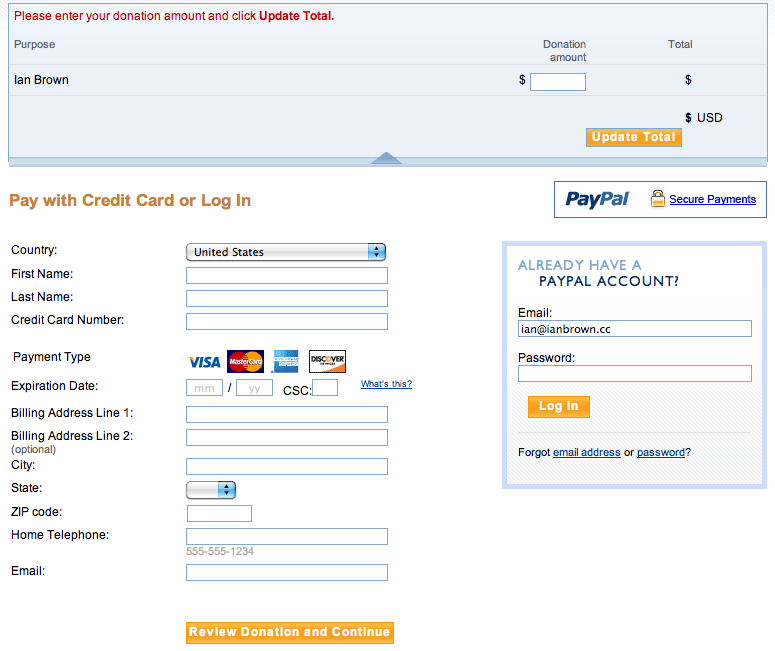
NOTE: It should NOT ask them to create a PayPal password at the bottom of the form. The form should only ask for their country, name, address, phone number, credit/debit card info, and email address (see above image).

After they enter their info, they can just click on the “Review Donation and Continue” button, review the info they entered, and then click the “Donate” button.

That should be it!

To check out what the page should look like after you create the button and/or email link, click on the link below:

https://www.paypal.com/cgi-bin/webscr?cmd=_s-xclick&hosted_button_id=8F4XP2Y5X7MBC

Feel free to test it by sending me a donation! ;)

Los Angeles Computer Repair | Los Angeles Computer Tech | Computer Repair Services

Share:
Reading time: 3 min

FREE DOWNLOADS


Get immediate access to the first 315 pages of Nirvana Zarabi-Smith’s famous Quantum Encyclopedia book and get 10% OFF!

Click here!

LIMITED TIME ONLY!

Now compatible with iPad and Android tablets!


Get immediate access to the first 100 pages of the 6th edition of Nirvana Zarabi-Smith’s incredibly useful A-Z Protocols book and get 10% OFF!

Click here!

LIMITED TIME ONLY!

Now compatible with iPad and Android tablets!

25% OFF Biofeedback Certification Training!

Have you been yearning to get certified as a biofeedback professional? Would you like to deepen your biofeedback knowledge so you can get the most out of your device?

Then take advantage of this
LIMITED TIME OFFER of getting 25% OFF of Nirvana Zarabi-Smith’s amazing Biofeedback Certification Training Program!

Click here!

LIMITED TIME ONLY!

Recent Posts

Do you find personalized ads on your smartphone “creepy”?  Here’s how to opt-out.

Do you find personalized ads on your smartphone “creepy”? Here’s how to opt-out.

January 31, 2016
How to get rid of the annoying Windows 10 Free Upgrade notification

How to get rid of the annoying Windows 10 Free Upgrade notification

August 29, 2015
How to turn any song into a cool iPhone ringtone (mp3)

How to turn any song into a cool iPhone ringtone (mp3)

March 12, 2015
Is your Mac slow?  Here are the 6 top ways to speed up your Mac!

Is your Mac slow? Here are the 6 top ways to speed up your Mac!

February 6, 2015

Blog Post Categories

Archives

© 2020 copyright Ian Brown // All rights reserved





