ianbrown.cc – computer tech & repair services – onsite and remote
  • Home
  • About Ian
  • Services
    • 10% Off Mobile Onsite Computer Repair – Greater Hartford, CT
  • Testimonials
  • Blog Archives
  • For Sale
  • Biofeedback Resources
    • + FREE DOWNLOAD
      The first 315 Pages of Nirvana Zarabi-Smith’s famous Quantum Encyclopedia ebook
      LIMITED TIME ONLY!
    • + FREE DOWNLOAD
      The first 100 pages of Nirvana Zarabi-Smith’s A-Z Protocols – INDIGO/SCIO ebook
      LIMITED TIME ONLY!
    • 25% Off Biofeedback Certification Courses at The Quantum Academies!
      LIMITED TIME ONLY!
  • Payments
  • Contact
Home
About Ian
Services
    10% Off Mobile Onsite Computer Repair – Greater Hartford, CT
Testimonials
Blog Archives
For Sale
Biofeedback Resources
    + FREE DOWNLOAD
The first 315 Pages of Nirvana Zarabi-Smith's famous Quantum Encyclopedia ebook
LIMITED TIME ONLY!

    + FREE DOWNLOAD
The first 100 pages of Nirvana Zarabi-Smith's A-Z Protocols – INDIGO/SCIO ebook
LIMITED TIME ONLY!

    25% Off Biofeedback Certification Courses at The Quantum Academies!
LIMITED TIME ONLY!

Payments
Contact
ianbrown.cc – computer tech & repair services – onsite and remote
  • Home
  • About Ian
  • Services
    • 10% Off Mobile Onsite Computer Repair – Greater Hartford, CT
  • Testimonials
  • Blog Archives
  • For Sale
  • Biofeedback Resources
    • + FREE DOWNLOAD
      The first 315 Pages of Nirvana Zarabi-Smith’s famous Quantum Encyclopedia ebook
      LIMITED TIME ONLY!
    • + FREE DOWNLOAD
      The first 100 pages of Nirvana Zarabi-Smith’s A-Z Protocols – INDIGO/SCIO ebook
      LIMITED TIME ONLY!
    • 25% Off Biofeedback Certification Courses at The Quantum Academies!
      LIMITED TIME ONLY!
  • Payments
  • Contact
Browsing Category
Mac
Apple•Mac•Tips and Tricks

Is your Mac slow? Here are the 6 top ways to speed up your Mac!

February 6, 2015 by Ian Brown No Comments

Recently my Mac was performing slower than normal, which was really bothersome to me, because I just recently upgraded my hard drive to a solid state drive (SSD).

In case you aren’t familiar, a SSD drive is the same technology as a USB flash drive (also called a jump drive or thumb drive).

Just like a USB flash drive, there are no moving parts in a solid state drive, unlike a conventional hard drive, which is one of the reasons why a SSD drive is so much faster!

You get super fast access to your data!

It’s the #1 way to speed up your computer, BY FAR. You’ll see a HUGE difference in the speed of your Mac (or PC) if you replace your conventional hard drive with a SSD drive.

Want a visual to see how much faster it is?

Watch this…

Continue reading
Share:
Reading time: 11 min
Apple•Cool Products & Services•iPad•Mac•Tips and Tricks•Video

How to Download Photos From Your Camera to Your iPad without a Computer with the Apple iPad Camera Connection Kit [VIDEO]

August 20, 2012 by Ian Brown No Comments

A client of mine recently asked me how they can hook up their camera directly to their iPad without a computer so they can travel with just their iPad and a camera, download their photos onto their iPad, and share them online. A very good question. One that I’m sure many of you would like to know the answer to as well. So…here we go.

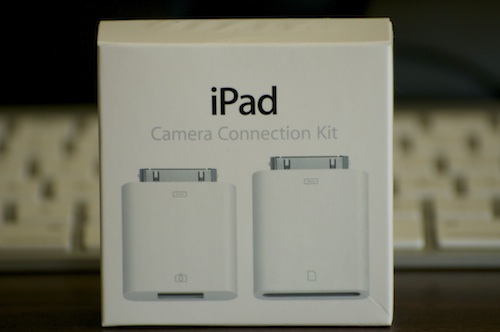
First thing you will need to do is purchase the Apple iPad Camera Connection Kit (Apple thinks of everything, don’t they?).

Apple iPad Camera Connection Kit
Product Link

Once you have that in hand, it’s a very simple process. But which adapter you use from the kit will be dependent upon whether your camera uses an SD card for its memory card or another type of memory card (the kit comes with both an SD card reader adapter and a USB adapter).

Your choice of adapter will also depend on whether you prefer to take out the SD card and pop that into the card reader, or if you just want to hook up your camera directly to your iPad via the USB cable, which will save you from having to take the SD card out of the camera. Given that, I will give you directions for both.

Option #1: Apple SD Card Reader Adapter

If your camera uses an SD card for its memory card

  1. Take the SD card out of your camera, insert it into the SD card reader adapter that comes with the Apple iPad Camera Connection Kit, and insert the adapter into the 30-pin dock on your iPad (the same place where you plug in the charger to charge it)
  2. The Photos app will launch on your iPad, and you will see thumbnail photos of the photos on your camera displayed on your iPad
  3. You have two choices when it comes to importing the pictures.
    • If you would like to import all of the pictures on your camera into your iPad, then touch the blue IMPORT button in the upper right corner of the screen, and select IMPORT ALL from the pop-down menu.
    • If you would like to just import certain photos from your camera into your iPad, then touch the photos that you want to import (after you touch each photo, a green circle with a white checkmark should appear next to it, telling you that you’ve successfully selected it). After you finish selecting the photos you want to import, touch the blue IMPORT button in the upper right hand corner of your screen, and select IMPORT SELECTED.
  4. After it imports your photos, it will ask you if you want to keep or delete the photos on your camera (the photos you just imported). Select the appropriate answer.
    NOTE: If you are traveling and have limited space on your card, then you might want to free up some space by selecting to delete the photos on your camera so you can take more pictures. If you do this, you might want to also back up your photos to iCloud (on your iPad, go to SETTINGS>iCloud>turn on PHOTOS) so you have your photos backed up.
  5. If you have imported all of the photos that you want to import, close the Photos app and then unplug the adapter you used from your iPad.
  6. Done!

Option #2: Apple USB Adapter

If your camera does not use an SD card for its memory card, or if you just don’t like feel like taking the SD card out of the camera

  1. Make sure your camera is ON, and is in PLAY mode (the mode that allows you to view the photos you’ve taken in the display screen/view finder of your camera).
  2. Hook up the USB cord that came with your camera to your camera, insert it into the USB adapter that comes with the Apple iPad Camera Connection Kit, and insert the adapter into the 30-pin dock on your iPad (the same place where you plug in the charger to charge it)
  3. The Photos app will launch on your iPad, and you will see thumbnail photos of the photos on your camera displayed on your iPad
  4. You have two choices when it comes to importing the pictures.
    • If you would like to import all of the pictures on your camera into your iPad, then touch the blue IMPORT button in the upper right corner of the screen, and select IMPORT ALL from the pop-down menu.
    • If you would like to just import certain photos from your camera into your iPad, then touch the photos that you want to import (after you touch each photo, a green circle with a white checkmark should appear next to it, telling you that you’ve successfully selected it). After you finish selecting the photos you want to import, touch the blue IMPORT button in the upper right hand corner of your screen, and select IMPORT SELECTED.
  5. After it imports your photos, it will ask you if you want to keep or delete the photos on your camera (the photos you just imported). Select the appropriate answer.
    NOTE: If you are traveling and have limited space on your card, then you might want to free up some space by selecting to delete the photos on your camera so you can take more pictures. If you do this, you might want to also back up your photos to iCloud (on your iPad, go to SETTINGS>iCloud>turn on PHOTOS) so you have your photos backed up.
  6. If you have imported all of the photos that you want to import, close the Photos app and then unplug the adapter you used from your iPad.
  7. Done!

I don’t have time to make a video right now to show you how to use it, so I will let the beautiful & smart Sharon Vaknin from CNET TV show you. She also includes some extra goodies, which I think you will find useful, including being able to hook up other USB devices to your iPad like a USB keyboard, USB mic, etc.

Enjoy!

Secrets of the Apple iPad Camera Connection Kit
by Sharon Vaknin from CNET TV

[youtube]http://www.youtube.com/watch?v=jgZiz3tojBE[/youtube]

Match.com: #1 Dating Site – View Pics for Free


Los Angeles Computer Repair | Los Angeles Computer Tech | Computer Repair Services

Share:
Reading time: 5 min
Apple•Events•Mac

Quotes About Steve Jobs and Jonathan Ive’s Commemorating Speech (Transcribed) at Apple’s “Remembering Steve” Event

April 10, 2012 by Ian Brown No Comments

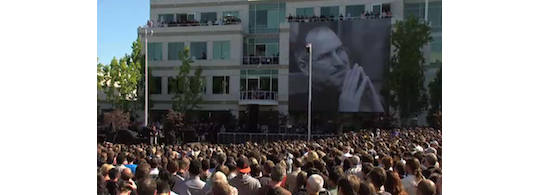
A client friend of mine sent me a link to the streaming of Apple’s Remembering Steve event, so I took the time to watch it. It was quite touching at times. I was also inspired by the comments that were made about him by people who knew him best.

It was great to see such a huge turnout at the event. People really loved him, and for good reason. He made this world a better place by being here, and I, for one, am very grateful for him having passed this way. I learned a lot from him business wise, and I am also quite the Apple fanboy, although I don’t wear it on my sleeve.

I knew the very first time I laid my eyes on a Mac that it would be hugely successful. I even wrote down in my journal to make sure I bought Macs for my business. It was one of those “Blink” moments, you know? If you’re not sure what I am referring to, read Blink by Malcolm Gladwell. Great book, as well as his other books, Outliers and The Tipping Point. If you don’t want to wait until you get the book to find out what I’m talking about, then watch this video.

The commemorative speeches were great. In fact, I liked one speech so much that I transcribed it and posted it below. Not only is it clever and witty, but it also gives you a peak into a side of Steve that we never saw much, as he was a very private guy.

Here are some of the things they had to say about Steve:

Steve’s philosophy on life: “The joy of life is in the journey.”

“Steve never followed the hurd.”

“He always did what was right, not what was easy.”

“He valued beauty in everything.”

“He pushed himself and those around him incredibly hard to achieve more.”

“One more thing he leaves us. He leaves us with each other.”

“Without him, Apple would have died in the late nineties.”

“He thought about Apple until his last day.”

“He saw Disney paralyzed after Walt died, because they all asked what Walt would do. So he advised those at Apple to never ask what he would do. He told them to just do what’s right.”

The famous ad, “Here’s to the Crazy Ones” was meant more for the employees and for the company as a whole than for the customers. Steve crafted every word of this ad. He didn’t want the ad to be about him. He wanted it to be about Apple. So he didn’t run the ad with his voiceover.

Here is a rare video of Steve introducing the commercial to the Apple team for the first time. This video gives you great insight as to how Steve approached marketing with his beloved company:

[youtube]http://www.youtube.com/watch?v=VCz_SiPD_X0[/youtube]

Here’s the ad with Steve doing the voiceover:

[youtube]http://www.youtube.com/watch?v=GEPhLqwKo6g[/youtube]

And here is how the ad ran, with the voice of actor Richard Dreyfuss:

[youtube]http://www.youtube.com/watch?v=4oAB83Z1ydE[/youtube]

Here is the script from the commercial:

Here’s to the crazy ones. The misfits. The rebels. The troublemakers. The round pegs in the square holes. The ones who see things differently. They’re not fond of rules. And they have no respect for the status quo. You can quote them, disagree with them, glorify or vilify them. About the only thing you can’t do is ignore them. Because they change things. They push the human race forward. While some may see them as the crazy ones, we see genius. Because the people who are crazy enough to think they can change the world, are the ones who do.

And I didn’t know this existed, but here is the full version of “Think Different”:

Here’s to the crazy ones. The misfits. The rebels. The troublemakers. The round pegs in the square holes.

The ones who see things differently. They’re not fond of rules. And they have no respect for the status quo. You can quote them, disagree with them, glorify or vilify them.

About the only thing you can’t do is ignore them. Because they change things. They invent. They imagine. They heal. They explore. They create. They inspire. They push the human race forward.

Maybe they have to be crazy.

How else can you stare at an empty canvas and see a work of art? Or sit in silence and hear a song that’s never been written? Or gaze at a red planet and see a laboratory on wheels?

We make tools for these kinds of people.

While some see them as the crazy ones, we see genius. Because the people who are crazy enough to think they can change the world, are the ones who do.

More comments about Steve…

“He demanded excellence in everything he created.”

“In the last years, he made sure that those he loved knew it.”

“When producing Siri [the voice recognition software in the iPhone 4S], Steve Jobs asked, ‘Are you a man or a woman!’ Siri: ‘They have not assigned me a gender, sir!'”

“Steve Jobs is the only one in the world who can create products of technology that people love.” – Al Gore

Al Gore also noted this interesting study that I paraphrased from his speech at the event…

Steve Jobs had the uncanny ability to create products of technology that people actually love. A neuroscientist conducted a study to see whether or not the iPhone and the iPad were addictive. So he studied the parts of the brain that were fired off when people used them. After numerous tests and focus groups, he came to the conclusion that the parts of the brain that were fired off while using the iPhone and the iPad were not that of addiction, but that of love.

And the Steve Jobs quote that Al Gore ended his commemorating speech with was the following:

“And in the end, the love you take is equal to the love you make.” – Steve Jobs

Al Gore’s main theme in his speech was love. Interesting. I guess that tends to be one’s focus as one gets older. Either that or he really loves Steve Jobs. But then again, who doesn’t?

If you’d like to watch Al Gore’s speech, check it out below…

[youtube]http://www.youtube.com/watch?v=prUDQYc5pn4[/youtube]

Here are a few comments that Jonathan Mak made about Steve Jobs…

“For Steve Jobs, every day was like Christmas morning, and nothing could shake that feeling.”

“Here was a man who knew precisely what the future looked like, and had no patience for anyone or anything who got in the way. Not a second was to be wasted. The vision was too important. This is what he meant in that famous Stanford commencement speech: “your time is limited, so don’t waste it living someone else’s life.’ ”

As stated above, Steve’s philosophy on life drove him. It was what made Apple Apple, and it’s also how Steve was able to make one of the most incredible corporate turnarounds in corporate history.

One quote that Steve heard when he was young came to be the driving force of his ambition.

Steve explains it this way…

“When I was 17, I read a quote that went something like: ‘If you live each day as if it was your last, someday you’ll most certainly be right.’ It made an impression on me, and since then, for the past 33 years, I have looked in the mirror every morning and asked myself: ‘If today were the last day of my life, would I want to do what I am about to do today?’ And whenever the answer has been “No” for too many days in a row, I know I need to change something.”

And lastly, Jony (pronounced “Johnny”) Ive, Senior Vice President of Industrial Design at Apple Inc., gave a brilliant speech commemorating Steve Jobs at the “Celebrating Steve” event. It was so good, that I decided to transcribe it for you and post it below. I hope you enjoy it.

And Steve, wherever you are, THANK YOU for all that you did while you were here. Because of you, my mother can read with ease…because of you, my father no longer has to have me fix the computer every time I visit…and because of you, my life has changed forever from the lessons you taught me both about business, and about life. You rock!

========================================================

Transcription of Jony Ive’s Speech Commemorating Steve Jobs

You know Steve used to say to me a lot, “Hey Johnny, here’s a dopey idea.” And sometimes they were…really dopey. Sometimes they were truly dreadful. But sometimes…they took the air from the room…and they left us both completely silent. Bold, crazy, magnificent ideas. Or quiet simple ones, which in their subtlety, their detail, they were utterly profound.

And just as Steve loved ideas and loved making stuff, he treated the process of creativity with a rare and a wonderful reverence. You see, I think he, better than anyone, understood that while ideas ultimately can be so powerful, they begin as fragile barely formed thoughts, so easily missed, so easily compromised, so easily just squished.

You know I love the way that he listened so intently. I loved his perception, his remarkable sensitivity, and his surgically precise opinion. I really believe there was beauty in how singular, how keen his insight was, even though sometimes it could sting.

As I’m sure many of you know, Steve didn’t confine his sense of excellence to making products. You know when we traveled together, we would check in, and I’d go up to my room, and I’d leave my bags very neatly by the door, and I wouldn’t unpack. And I would go and sit on the bed…I would go and sit on the bed next to the phone, and I would wait for the inevitable phone call, “Hey Johnny. This hotel sucks. Let’s go!”

He used to joke that the lunatics had taken over the asylum as we shared a giddy excitement spending months and months working on a part of a product that nobody would ever see, or not with their eyes. But we did it because we really believed that it was right, because we cared. He believed that there was a gravity, almost a sense of civic responsibility, to care way beyond any sort of functional imperative.

Now while the work hopefully appeared inevitable, appeared simple and easy, it really cost. It cost us all, didn’t it? But you know what? It cost him most. He cared the most. He worried the most deeply. He constantly questioned, “Is this good enough? Is this right?” And despite all his successes, all his achievements, he never presumed, he never assumed that we would get there in the end.

When the ideas didn’t come, and when the prototypes failed, it was with great intent, with faith, he decided to believe we eventually would make something great.

But the joy of getting there…I loved his enthusiasm. His simple delight, often I think mixed with some relief, but that yeah we got there…we got there in the end, and it was good.

You can see his smile, can’t you. The celebration of making something great for everybody. Enjoying the defeat of cynicism. The rejection of reason. The rejection of being told 100 times, “You can’t do that.” So his, I think, was a victory for beauty, for purity, and as he would say, “for giving a damn.”

He was my closest and my most loyal friend. We worked together for nearly 15 years, and he still laughed at how I said “aluminium”.

For the past two weeks, I think we’ve all been struggling to find ways to say, “Good-bye.” This morning, I simply want to end by saying, “Thank you, Steve. Thank you for your remarkable vision which has united and inspired this extraordinary group of people. For all that we have learned from you, and all that we will continue to learn from each other, thank you, Steve.”

Here is the video of Jony’s speech:

[youtube]http://www.youtube.com/watch?v=7hOCyOlTmyM[/youtube]

And here is one of Steve’s favorite bands performing at this event…Coldplay!

[youtube]http://www.youtube.com/watch?v=stDYKAcr9WA[/youtube]

Here is Norah Jone’s beautiful performance of “Forever Young” at the event…

[youtube]http://www.youtube.com/watch?v=WdFt2KFcZdQ[/youtube]

If you would like to see the entire event, go here:

http://events.apple.com.edgesuite.net/10oiuhfvojb23/event/index.html

Match.com: #1 Dating Site – View Pics for Free


Los Angeles Computer Repair | Los Angeles Computer Tech | Computer Repair Services

Share:
Reading time: 10 min
Apple•Cool Products & Services•iPad•Mac

How to close an iPad app like a two year old

by Ian Brown No Comments

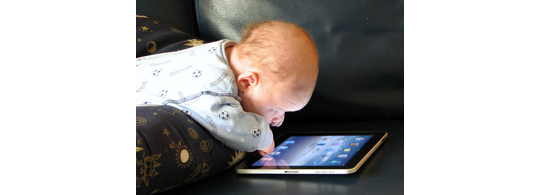
It never ceases to amaze me how intuitive Apple makes their operating systems, including that of the iPad. We were just at my uncle’s this weekend, and a close friend of the family had his two year old with him. His parents are very much Apple fans, so of course they have an iPad.

Consequently, Hiro, the very cool and hip two year old, has working knowledge of the iPad. His favorite app? Angry Birds? Nope. Need for Speed? Not old enough. Elmo’s ABCs? Not a chance. No, the app of choice for this clever toddler is none other than Netflix. I didn’t derive any conclusion from that (I’m not one to judge a two year old), but I found that to be pretty interesting.

Anyway, we recently gave my mother the new iPad for her birthday, and so we had that with us. First I took some pictures, and then a movie with the iPad of Hiro and his older brother horsing around. They were wrestling on the floor. And when they found out that I was recording it, they really put on a show! Clearly they LOVE the attention.

So after they finished their “match”, they crawled up to the couch where I was recording them from and asked to see it. I showed it to them. Hiro LOVED watching himself wrestle with his brother and make noises that you would think would be coming from a cat in pain.

In fact, he loved it so much that he asked if he could put the iPad on his lap so he could watch it again. I obliged, of course. He then proceeded to play that 20 second clip over and over and over again, laughing more hysterically with each subsequent viewing.

But like all children, his attention span waned, and he wanted to move on. So he reached out with his tiny hand with his figures spread out, put all five fingers on the iPad screen, and brought his fingers together so they touched. What happened? The iPhoto app closed, of course!

I know that it seems obvious now, but I would have never thought of that as a way to close an app being a tech guy. However children, especially at that age, just do things intuitively. They use their sixth sense more in a day than we adults do in a month, and it certainly seems to work well for them.

This is also a perfect example of the brilliance of Apple. They make their computers think the way we humans think (no matter how old), instead of having to teach us humans how their computers think (PC, are you reading this? ;p ).

There’s a quote by Steve Jobs that encompasses the mindset Apple has when they design their products:

“They’re not stupid for not knowing how to use our products. We’re stupid if they don’t know how to use our products.”

So if you want to get better at using the iPad, tap deeper into your intuition and think more like a two year old. ;)

Match.com: #1 Dating Site – View Pics for Free


Los Angeles Computer Repair | Los Angeles Computer Tech | Computer Repair Services

Share:
Reading time: 2 min
Page 1 of 201234»1020...Last »

FREE DOWNLOADS


Get immediate access to the first 315 pages of Nirvana Zarabi-Smith’s famous Quantum Encyclopedia book and get 10% OFF!

Click here!

LIMITED TIME ONLY!

Now compatible with iPad and Android tablets!


Get immediate access to the first 100 pages of the 6th edition of Nirvana Zarabi-Smith’s incredibly useful A-Z Protocols book and get 10% OFF!

Click here!

LIMITED TIME ONLY!

Now compatible with iPad and Android tablets!

25% OFF Biofeedback Certification Training!

Have you been yearning to get certified as a biofeedback professional? Would you like to deepen your biofeedback knowledge so you can get the most out of your device?

Then take advantage of this
LIMITED TIME OFFER of getting 25% OFF of Nirvana Zarabi-Smith’s amazing Biofeedback Certification Training Program!

Click here!

LIMITED TIME ONLY!

Recent Posts

Do you find personalized ads on your smartphone “creepy”?  Here’s how to opt-out.

Do you find personalized ads on your smartphone “creepy”? Here’s how to opt-out.

January 31, 2016
How to get rid of the annoying Windows 10 Free Upgrade notification

How to get rid of the annoying Windows 10 Free Upgrade notification

August 29, 2015
How to turn any song into a cool iPhone ringtone (mp3)

How to turn any song into a cool iPhone ringtone (mp3)

March 12, 2015
Is your Mac slow?  Here are the 6 top ways to speed up your Mac!

Is your Mac slow? Here are the 6 top ways to speed up your Mac!

February 6, 2015

Blog Post Categories

Archives

© 2020 copyright Ian Brown // All rights reserved