ianbrown.cc – computer tech & repair services – onsite and remote
  • Home
  • About Ian
  • Services
    • 10% Off Mobile Onsite Computer Repair – Greater Hartford, CT
  • Testimonials
  • Blog Archives
  • For Sale
  • Biofeedback Resources
    • + FREE DOWNLOAD
      The first 315 Pages of Nirvana Zarabi-Smith’s famous Quantum Encyclopedia ebook
      LIMITED TIME ONLY!
    • + FREE DOWNLOAD
      The first 100 pages of Nirvana Zarabi-Smith’s A-Z Protocols – INDIGO/SCIO ebook
      LIMITED TIME ONLY!
    • 25% Off Biofeedback Certification Courses at The Quantum Academies!
      LIMITED TIME ONLY!
  • Payments
  • Contact
Home
About Ian
Services
    10% Off Mobile Onsite Computer Repair – Greater Hartford, CT
Testimonials
Blog Archives
For Sale
Biofeedback Resources
    + FREE DOWNLOAD
The first 315 Pages of Nirvana Zarabi-Smith's famous Quantum Encyclopedia ebook
LIMITED TIME ONLY!

    + FREE DOWNLOAD
The first 100 pages of Nirvana Zarabi-Smith's A-Z Protocols – INDIGO/SCIO ebook
LIMITED TIME ONLY!

    25% Off Biofeedback Certification Courses at The Quantum Academies!
LIMITED TIME ONLY!

Payments
Contact
ianbrown.cc – computer tech & repair services – onsite and remote
  • Home
  • About Ian
  • Services
    • 10% Off Mobile Onsite Computer Repair – Greater Hartford, CT
  • Testimonials
  • Blog Archives
  • For Sale
  • Biofeedback Resources
    • + FREE DOWNLOAD
      The first 315 Pages of Nirvana Zarabi-Smith’s famous Quantum Encyclopedia ebook
      LIMITED TIME ONLY!
    • + FREE DOWNLOAD
      The first 100 pages of Nirvana Zarabi-Smith’s A-Z Protocols – INDIGO/SCIO ebook
      LIMITED TIME ONLY!
    • 25% Off Biofeedback Certification Courses at The Quantum Academies!
      LIMITED TIME ONLY!
  • Payments
  • Contact
Browsing Category
Facebook
Facebook•Social Media

How to Remove Your Location from Your Facebook Status Update

November 4, 2011 by Ian Brown 13 Comments

I love Facebook, but one thing that I don’t care for is that they automatically activate their new features in our profiles instead of telling us about it, and asking us if we want the new idea implemented into our profile.

So when Facebook adds a new feature, and we don’t like it, we have to go through the hassle of finding the new setting for the new feature, and then change it back to the way it was. But I suppose that is a small price to pay for a website that allows us to easily communicate and share things with people from all over the world in seconds…for free.

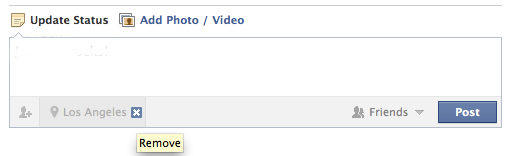
One of the relatively new features Facebook implemented is including your current location in your status update. I don’t know about you, but I’m not one to want everyone to know where I am at any given moment, and plenty of my friends are the same way.

In fact, it was one of my friends that posted a status update about this very issue. So I found out how to do it, told her, and then figured that there are plenty of other people who would like to know the same thing, which is why I am here right now, sharing this info with you.

So let’s get to it…

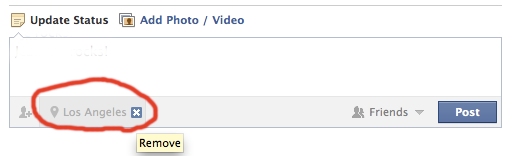
Here’s what your status update box looks like now if it still has the location in it. I’ve circled my location in red.

To get rid of the location in your status, do this:

  1. Start typing a new status update
  2. When you see your location being displayed at the bottom of the status box, hover over the city with your cursor and look for the “X” to the right of the city
  3. Click on that “X” and your status updates will no longer have the location added to them.
  4. You may have to click on the “Places” icon. It looks kind of like a hot air balloon.
And when you’re done, it should look like this:
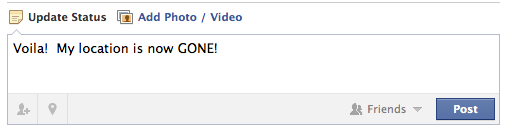
That’s it. Pretty painless. So now you can continue to post Facebook status updates with your current location and destination remaining unknown.

Match.com: #1 Dating Site – View Pics for Free


Los Angeles Computer Repair | Los Angeles Computer Tech | Computer Repair Services

Share:
Reading time: 1 min
Facebook•Tips and Tricks

Can I change the name of my Facebook Page?

Facebook page
December 30, 2010 by Ian Brown 4 Comments

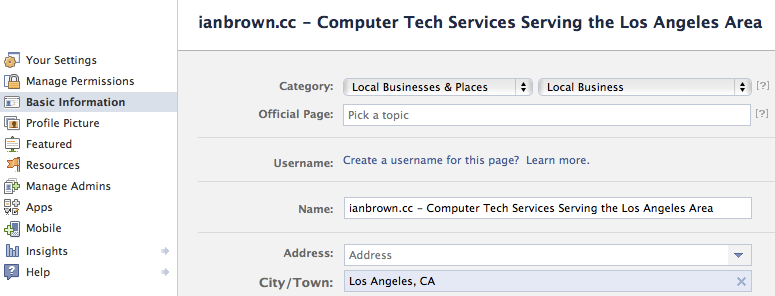
Facebook pageDo you have a Facebook page for you or your business? I’m not talking about your regular Facebook profile. I’m talking about a Facebook page for your business where you are actually allowed to do business, unlike your profile page. If you don’t, then I highly suggest you get one by going to www.facebook.com/pages and clicking on the “+ Create Page” button in the upper right section of that page to make one. It can be an incredibly useful tool for your business, as Facebook is where people hang out nowadays on the Internet.

For those of you who do have one, do wish you could change the name of it? Well, if you have less than 100 people who have “Liked” your Facebook page, then I have good news for you. You can change it very easily.

Here’s how:

  1. Log into Facebook
  2. Go to your Facebook Page
  3. Click on “Edit Page” under the profile picture for your Facebook Page
  4. Make sure “Basic Information” is selected on the left
  5. (click to enlarge)

  6. Under “Name” on the right”, change the name of your page
  7. Scroll down the page and click the “Save Changes” button
  8. Done!

However, if more than 100 people have “Liked” your Facebook page, then unfortunately you can’t change the name of it.

Here is FB’s answer to this question in their help section:

How do I change my Page name?

If an error was made in your Page name when it was created, you have the option to edit the Page name to correct this issue. This option is only limited to Pages with less than 100 connections. After selecting to edit your Page, you can adjust this information from the “Basic Information” section.

If that is the case, there are two options that I can think of:

  1. Start a new Facebook page and then invite everyone to that new page. However, you will lose all of your posts, photos, videos, and you’ll have to re-upload and re-post them.
  2. Not sure if Facebook still does this, but you can create a new Facebook page, and then send Facebook the URL of your current FB page, and the URL of your new FB page, and ask the to merge them. They did that a while back when they first came out with FB pages. People were merging their FB Group with their new FB page so they wouldn’t lose their followers.

To contact Facebook for Option#2, go to Facebook’s help section and see if you can find a way to email them. Try asking a question and keep saying that their answer did not answer your question. Hopefully, they’ll eventually give you a way to contact them if you keep saying that your question is still not answered.


Los Angeles Computer Repair | Los Angeles Computer Tech | Computer Repair Services

Share:
Reading time: 2 min

FREE DOWNLOADS


Get immediate access to the first 315 pages of Nirvana Zarabi-Smith’s famous Quantum Encyclopedia book and get 10% OFF!

Click here!

LIMITED TIME ONLY!

Now compatible with iPad and Android tablets!


Get immediate access to the first 100 pages of the 6th edition of Nirvana Zarabi-Smith’s incredibly useful A-Z Protocols book and get 10% OFF!

Click here!

LIMITED TIME ONLY!

Now compatible with iPad and Android tablets!

25% OFF Biofeedback Certification Training!

Have you been yearning to get certified as a biofeedback professional? Would you like to deepen your biofeedback knowledge so you can get the most out of your device?

Then take advantage of this
LIMITED TIME OFFER of getting 25% OFF of Nirvana Zarabi-Smith’s amazing Biofeedback Certification Training Program!

Click here!

LIMITED TIME ONLY!

Recent Posts

Do you find personalized ads on your smartphone “creepy”?  Here’s how to opt-out.

Do you find personalized ads on your smartphone “creepy”? Here’s how to opt-out.

January 31, 2016
How to get rid of the annoying Windows 10 Free Upgrade notification

How to get rid of the annoying Windows 10 Free Upgrade notification

August 29, 2015
How to turn any song into a cool iPhone ringtone (mp3)

How to turn any song into a cool iPhone ringtone (mp3)

March 12, 2015
Is your Mac slow?  Here are the 6 top ways to speed up your Mac!

Is your Mac slow? Here are the 6 top ways to speed up your Mac!

February 6, 2015

Blog Post Categories

Archives

© 2020 copyright Ian Brown // All rights reserved