How to Remove Your Location from Your Facebook Status Update
I love Facebook, but one thing that I don’t care for is that they automatically activate their new features in our profiles instead of telling us about it, and asking us if we want the new idea implemented into our profile.
So when Facebook adds a new feature, and we don’t like it, we have to go through the hassle of finding the new setting for the new feature, and then change it back to the way it was. But I suppose that is a small price to pay for a website that allows us to easily communicate and share things with people from all over the world in seconds…for free.
One of the relatively new features Facebook implemented is including your current location in your status update. I don’t know about you, but I’m not one to want everyone to know where I am at any given moment, and plenty of my friends are the same way.
In fact, it was one of my friends that posted a status update about this very issue. So I found out how to do it, told her, and then figured that there are plenty of other people who would like to know the same thing, which is why I am here right now, sharing this info with you.
So let’s get to it…
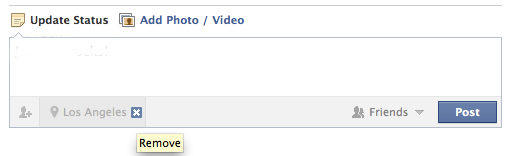
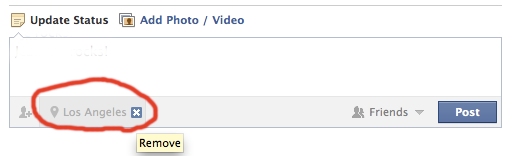
Here’s what your status update box looks like now if it still has the location in it. I’ve circled my location in red.

To get rid of the location in your status, do this:
- Start typing a new status update
- When you see your location being displayed at the bottom of the status box, hover over the city with your cursor and look for the “X” to the right of the city
- Click on that “X” and your status updates will no longer have the location added to them.
- You may have to click on the “Places” icon. It looks kind of like a hot air balloon.
And when you’re done, it should look like this:
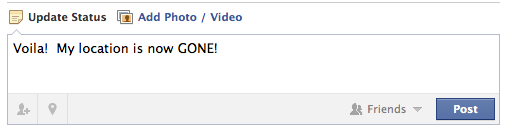
That’s it. Pretty painless. So now you can continue to post Facebook status updates with your current location and destination remaining unknown.
Match.com: #1 Dating Site – View Pics for Free
Los Angeles Computer Repair | Los Angeles Computer Tech | Computer Repair Services









When I follow this on my iPhone no “x” appears next to the city to delete!
Hi Judy,
You need to do this with your computer, not your iPhone. ;)
When I follow the directions on my computer the city does not show up; therefore, no “x”. :(
Interesting. What browser are you using? Try a different Internet browser (Firefox, Chrome, etc.).
When I do this it removes the location for that particular post but it returns on the next post.
Worked for me. Thanks for sharing!!!
Sherry, yes, it is quite annoying. It seems you have to remember to do it EVERY time on a desktop computer. For me, it frequently lists a city two counties away, so who knows what FB is tapping into to get that info.
thank you thank you! was looking for a solution for a long time and your explanation was the best on the internet. Excellent work.
Sherry, Chris is right.
My pleasure, Jennifer!
You bet, joeFace! Thanks!
Done! Thank you!
Thank you muchly! Hate the feature, now have a solution for it <3
You bet HFit & Josephine! Glad it worked for you!
Thank you! Very helpful!!